图像生成
概述
通过 API,你可以使用 gpt-image-2.5-sunburst 和 gpt-image-2.5-flare,根据文本提示词生成和编辑图像。如果工作流最看重编辑精度,可选择 Sunburst;如果需要快速、高质量的日常图像生成,可选择 Flare。你可以通过两种 API 使用图像生成功能:
Image API
Image API 提供两个端点,各有不同的功能:
Responses API
Responses API 让你能够在对话或多步骤流程中生成图像。它将图像生成作为内置工具提供,并接受上下文中的图像输入和输出。
与 Image API 相比,它还提供:
- 多轮编辑:通过提示词反复对图像进行高保真编辑
- 灵活输入:接受图像 File ID 作为输入图像,而不局限于字节数据
有关能够调用图像生成工具的主线模型,请参阅支持的模型。
选择合适的 API
- 如果只需要根据一个提示词生成或编辑一张图像,Image API 是最佳选择。
- 如果希望使用 GPT Image 构建可以通过对话编辑图像的体验,请使用 Responses API。
使用 Image API 时,直接将 model 设为 gpt-image-2.5-sunburst 或 gpt-image-2.5-flare。使用 Responses API 时,在顶层选择支持的主线模型,并在图像生成工具的 model 字段中指定 gpt-image-2.5-sunburst 或 gpt-image-2.5-flare。
两种 API 都允许你通过调整质量、尺寸、格式和压缩率来自定义输出。
为确保这些模型得到负责任的使用,在使用 GPT Image 模型之前,你可能需要在开发者控制台中完成 API 组织验证。
GPT-Image-2.6
GPT-Image-2.6 包含适合细致视觉工作的 Sunburst 和适合快速迭代的 Flare。两者都通过 Image API 支持复杂度控制、标注引导编辑、SVG 输出和 GIF 动画输出。探索 Sunburst 示例及其生成设置。
设置图像复杂度
使用请求字段 complexity,控制图像模型在渲染前进行多少规划。较低的复杂度适合更换背景或标牌等集中于局部的编辑。较高的复杂度有助于处理密集文字、复杂布局和物体之间的关系。较高的复杂度也可能增加延迟并引入不希望出现的变化,因此请针对你的任务比较结果。
Sunburst 和 Flare 支持的复杂度级别为 low、medium 和 high。如果省略 complexity,两者均使用 high。独立的 quality 设置控制渲染质量。
调整复杂度不会单独收费。
Sunburst 使用同一提示词,以中等质量生成了这些剪纸足球场景。请比较复杂度变化时奖杯、球衣以及“CHAMPIONS”标牌的位置。
低复杂度

中等复杂度

高复杂度

安全标识符
如果你的应用面向个人终端用户,请在每个图像生成或图像编辑请求中包含稳定、保护隐私的 safety_identifier。对用户名或电子邮件地址做哈希处理,不要发送能够识别身份的信息,并将标识符保持在 128 个字符以内。建议使用安全标识符,但这不是必需项。
Images API 的 user 参数已弃用。请改用 safety_identifier 发送相同的标识符。现有使用 user 的请求仍受支持。非空的 safety_identifier 优先于 user;当省略 safety_identifier,或其值为 null、空字符串时,如果存在 user,API 就使用它。
生成图像
你可以使用图像生成端点根据文本提示词创建图像,也可以在 Responses API 中使用图像生成工具,在对话过程中生成图像。
有关自定义输出(尺寸、质量、格式和压缩率)的更多信息,请参阅下方自定义图像输出一节。
设置 n 参数,即可在单个请求中一次生成多张图像(默认情况下,API 返回一张图像)。
Image API
生成一张图像
import OpenAI from "openai";
import fs from "fs";
const openai = new OpenAI();

const prompt = `
A children's book drawing of a veterinarian using a stethoscope to
listen to the heartbeat of a baby otter.
`;

const result = await openai.images.generate({
  model: "gpt-image-2.5-sunburst",
  prompt,
});

// Save the image to a file
const image_base64 = result.data?.[0]?.b64_json;
if (!image_base64) throw new Error("Image generation returned no image.");
const image_bytes = Buffer.from(image_base64, "base64");
fs.writeFileSync("otter.png", image_bytes);
from openai import OpenAI
import base64
client = OpenAI()
prompt = """
A children's book drawing of a veterinarian using a stethoscope to
listen to the heartbeat of a baby otter.
"""
result = client.images.generate(model="gpt-image-2.5-sunburst", prompt=prompt)
image_base64 = result.data[0].b64_json
image_bytes = base64.b64decode(image_base64)
# Save the image to a file
with open("otter.png", "wb") as f:
f.write(image_bytes)package main
import (
"context"
"encoding/base64"
"os"
"github.com/openai/openai-go/v3"
)
func main() {
client := openai.NewClient()
result, err := client.Images.Generate(context.Background(), openai.ImageGenerateParams{
Model: openai.ImageModel("gpt-image-2.5-sunburst"),
Prompt: "A children's book drawing of a veterinarian using a stethoscope to " +
"listen to the heartbeat of a baby otter.",
})
if err != nil {
panic(err)
}
image, err := base64.StdEncoding.DecodeString(result.Data[0].B64JSON)
if err != nil {
panic(err)
}
if err := os.WriteFile("otter.png", image, 0o600); err != nil {
panic(err)
}
}import com.openai.client.OpenAIClient;
import com.openai.client.okhttp.OpenAIOkHttpClient;
import com.openai.models.images.ImageGenerateParams;
import java.io.IOException;
import java.nio.file.Files;
import java.nio.file.Path;
import java.util.Base64;
var images =
client
.images()
.generate(
ImageGenerateParams.builder()
.model("gpt-image-2.5-sunburst")
.prompt("A watercolor robot reading in a library")
.build());
Files.write(
Path.of("generated-image.png"),
Base64.getDecoder().decode(images.data().orElseThrow().get(0).b64Json().orElseThrow()));using OpenAI.Images;
string key = Environment.GetEnvironmentVariable("OPENAI_API_KEY")!;
string model = "gpt-image-2.5-sunburst";
ImageClient client = new(model, key);
GeneratedImage image = await client.GenerateImageAsync(
"A children's book drawing of a veterinarian using a stethoscope to "
+ "listen to the heartbeat of a baby otter."
);
await File.WriteAllBytesAsync("otter.png", image.ImageBytes.ToArray());require "base64"
require "openai"
client = OpenAI::Client.new
result = client.images.generate(
model: "gpt-image-2.5-sunburst",
prompt: "A watercolor robot reading in a library"
)
generated_image = result.data&.first or raise "No image returned"
File.binwrite(
"generated-image.png",
Base64.strict_decode64(generated_image.b64_json)
)curl -X POST "https://api.openai.com/v1/images/generations" \
-H "Authorization: Bearer $OPENAI_API_KEY" \
-H "Content-type: application/json" \
-d '{
"model": "gpt-image-2.5-sunburst",
"prompt": "A children'\''s book drawing of a veterinarian using a stethoscope to listen to the heartbeat of a baby otter."
}' | jq -r '.data[0].b64_json' | base64 --decode > otter.pngopenai images generate \
--model gpt-image-2.5-sunburst \
--prompt "A children's book drawing of a veterinarian using a stethoscope to listen to the heartbeat of a baby otter." \
--raw-output \
--transform 'data.0.b64_json' | base64 --decode > otter.pngResponses API
生成一张图像
import OpenAI from "openai";
const openai = new OpenAI();

const response = await openai.responses.create({
  model: "gpt-6.2-astra",
  input:
    "Generate an image of gray tabby cat hugging an otter with an orange scarf",
  tools: [{ type: "image_generation", model: "gpt-image-2.5-sunburst" }],
});

// Save the image to a file
const imageData = response.output
  .filter((output) => output.type === "image_generation_call")
  .map((output) => output.result);

if (imageData.length > 0) {
  const imageBase64 = imageData[0];
  if (!imageBase64) throw new Error("Image generation returned no image.");
  const fs = await import("fs");
  fs.writeFileSync("otter.png", Buffer.from(imageBase64, "base64"));
}
from openai import OpenAI
import base64
client = OpenAI()
response = client.responses.create(
model="gpt-6.2-astra",
input="Generate an image of gray tabby cat hugging an otter with an orange scarf",
tools=[{"type": "image_generation", "model": "gpt-image-2.5-sunburst"}],
)
# Save the image to a file
image_data = [
output.result
for output in response.output
if output.type == "image_generation_call"
]
if image_data:
image_base64 = image_data[0]
with open("otter.png", "wb") as f:
f.write(base64.b64decode(image_base64))package main
import (
"context"
"encoding/base64"
"os"
"github.com/openai/openai-go/v3"
"github.com/openai/openai-go/v3/responses"
)
func main() {
client := openai.NewClient()
response, err := client.Responses.New(context.Background(), responses.ResponseNewParams{
Model: "gpt-6.2-astra",
Input: responses.ResponseNewParamsInputUnion{
OfString: openai.String("Generate an image of gray tabby cat hugging an otter with an orange scarf"),
},
Tools: []responses.ToolUnionParam{{OfImageGeneration: &responses.ToolImageGenerationParam{Model: "gpt-image-2.5-sunburst"}}},
})
if err != nil {
panic(err)
}
saveFirstGeneratedImage(response, "otter.png")
}
func saveFirstGeneratedImage(response *responses.Response, filename string) {
for _, output := range response.Output {
if output.Type != "image_generation_call" {
continue
}
image, err := base64.StdEncoding.DecodeString(output.AsImageGenerationCall().Result)
if err != nil {
panic(err)
}
if err := os.WriteFile(filename, image, 0o600); err != nil {
panic(err)
}
return
}
panic("response did not include an image generation call")
}using OpenAI.Responses;
#pragma warning disable OPENAI001
string key = Environment.GetEnvironmentVariable("OPENAI_API_KEY")!;
ResponsesClient client = new(key);
CreateResponseOptions options = new() { Model = "gpt-6.2-astra" };
options.InputItems.Add(
ResponseItem.CreateUserMessageItem(
"Generate an image of a gray tabby cat hugging an otter with an orange scarf."
)
);
options.Tools.Add(ResponseTool.CreateImageGenerationTool(model: "gpt-image-2.5-sunburst"));
ResponseResult response = await client.CreateResponseAsync(options);
ImageGenerationCallResponseItem image = response
.OutputItems.OfType<ImageGenerationCallResponseItem>()
.FirstOrDefault()
?? throw new InvalidOperationException("No generated image was returned.");
await File.WriteAllBytesAsync("otter.png", image.ImageResultBytes.ToArray());require "base64"
require "openai"
client = OpenAI::Client.new
response = client.responses.create(
model: "gpt-6.2-astra",
input: "Generate an image of a gray tabby cat hugging an otter with an orange scarf.",
tools: [
{
type: :image_generation,
model: "gpt-image-2.5-sunburst"
}
]
)
image_call = response.output.find do |item|
item.is_a?(OpenAI::Models::Responses::ResponseOutputItem::ImageGenerationCall)
end
unless image_call.is_a?(OpenAI::Models::Responses::ResponseOutputItem::ImageGenerationCall)
raise "No image generation call returned"
end
encoded_image = image_call.result or raise "No image returned"
File.binwrite("otter.png", Base64.strict_decode64(encoded_image))多轮图像生成
使用 Responses API,你可以在上下文中提供图像生成调用的输出(也可以只使用图像 ID),或使用 previous_response_id 参数,构建涉及图像生成的多轮对话。这让你能够在多轮对话中不断迭代图像,随着对话推进细化提示词、应用新指令并调整视觉输出。
使用 Responses API 图像生成工具时,受支持的工具模型可以选择生成新图像,或编辑对话中已有的图像。可选的 action 参数控制这一行为:保持 action: "auto",让模型决定;设为 action: "generate",始终创建新图像;或在上下文中有图像时设为 action: "edit",强制进行编辑。
通过 action 强制创建图像
import OpenAI from "openai";
const openai = new OpenAI();

const response = await openai.responses.create({
  model: "gpt-6.2-astra",
  input:
    "Generate an image of gray tabby cat hugging an otter with an orange scarf",
  tools: [
    { type: "image_generation", model: "gpt-image-2.5-sunburst", action: "generate" },
  ],
});

// Save the image to a file
const imageData = response.output
  .filter((output) => output.type === "image_generation_call")
  .map((output) => output.result);

if (imageData.length > 0) {
  const imageBase64 = imageData[0];
  if (!imageBase64) throw new Error("Image generation returned no image.");
  const fs = await import("fs");
  fs.writeFileSync("otter.png", Buffer.from(imageBase64, "base64"));
}
from openai import OpenAI
import base64
client = OpenAI()
response = client.responses.create(
model="gpt-6.2-astra",
input="Generate an image of gray tabby cat hugging an otter with an orange scarf",
tools=[
{"type": "image_generation", "model": "gpt-image-2.5-sunburst", "action": "generate"}
],
)
# Save the image to a file
image_data = [
output.result
for output in response.output
if output.type == "image_generation_call"
]
if image_data:
image_base64 = image_data[0]
with open("otter.png", "wb") as f:
f.write(base64.b64decode(image_base64))package main
import (
"context"
"encoding/base64"
"os"
"github.com/openai/openai-go/v3"
"github.com/openai/openai-go/v3/responses"
)
func main() {
client := openai.NewClient()
response, err := client.Responses.New(context.Background(), responses.ResponseNewParams{
Model: "gpt-6.2-astra",
Input: responses.ResponseNewParamsInputUnion{
OfString: openai.String("Generate an image of gray tabby cat hugging an otter with an orange scarf"),
},
Tools: []responses.ToolUnionParam{{OfImageGeneration: &responses.ToolImageGenerationParam{Model: "gpt-image-2.5-sunburst", Action: "generate"}}},
})
if err != nil {
panic(err)
}
for _, output := range response.Output {
if output.Type != "image_generation_call" {
continue
}
image, err := base64.StdEncoding.DecodeString(output.AsImageGenerationCall().Result)
if err != nil {
panic(err)
}
if err := os.WriteFile("otter.png", image, 0o600); err != nil {
panic(err)
}
return
}
panic("response did not include an image generation call")
}using OpenAI.Responses;
#pragma warning disable OPENAI001
string key = Environment.GetEnvironmentVariable("OPENAI_API_KEY")!;
ResponsesClient client = new(key);
CreateResponseOptions options = new() { Model = "gpt-6.2-astra" };
options.InputItems.Add(
ResponseItem.CreateUserMessageItem(
"Generate an image of a gray tabby cat hugging an otter with an orange scarf."
)
);
options.Tools.Add(
ResponseTool.CreateImageGenerationTool(
model: "gpt-image-2.5-sunburst",
action: ImageGenerationToolAction.Generate
)
);
ResponseResult response = await client.CreateResponseAsync(options);
ImageGenerationCallResponseItem image = response
.OutputItems.OfType<ImageGenerationCallResponseItem>()
.FirstOrDefault()
?? throw new InvalidOperationException("No generated image was returned.");
await File.WriteAllBytesAsync("otter.png", image.ImageResultBytes.ToArray());require "base64"
require "openai"
client = OpenAI::Client.new
response = client.responses.create(
model: "gpt-6.2-astra",
input: "Generate an image of a gray tabby cat hugging an otter with an orange scarf.",
tools: [
{
type: :image_generation,
model: "gpt-image-2.5-sunburst",
action: :generate
}
]
)
image_call = response.output.find do |item|
item.is_a?(OpenAI::Models::Responses::ResponseOutputItem::ImageGenerationCall)
end
unless image_call.is_a?(OpenAI::Models::Responses::ResponseOutputItem::ImageGenerationCall)
raise "No image generation call returned"
end
encoded_image = image_call.result or raise "No image returned"
output_path = ENV.fetch("OPENAI_EXAMPLE_OUTPUT_PATH", "otter.png")
File.binwrite(output_path, Base64.decode64(encoded_image))
puts(output_path)如果强制使用 edit,却没有在上下文中提供图像,调用会返回错误。保持 action 为 auto,让模型决定何时生成或编辑。
使用上一条响应的 ID
多轮图像生成
import OpenAI from "openai";
const openai = new OpenAI();

const response = await openai.responses.create({
  model: "gpt-6.2-astra",
  input:
    "Generate an image of gray tabby cat hugging an otter with an orange scarf",
  tools: [{ type: "image_generation", model: "gpt-image-2.5-sunburst" }],
});

const imageData = response.output
  .filter((output) => output.type === "image_generation_call")
  .map((output) => output.result);

if (imageData.length > 0) {
  const imageBase64 = imageData[0];
  if (!imageBase64) throw new Error("Image generation returned no image.");
  const fs = await import("fs");
  fs.writeFileSync("cat_and_otter.png", Buffer.from(imageBase64, "base64"));
}

// Follow up

const response_fwup = await openai.responses.create({
  model: "gpt-6.2-astra",
  previous_response_id: response.id,
  input: "Now make it look realistic",
  tools: [{ type: "image_generation", model: "gpt-image-2.5-sunburst" }],
});

const imageData_fwup = response_fwup.output
  .filter((output) => output.type === "image_generation_call")
  .map((output) => output.result);

if (imageData_fwup.length > 0) {
  const imageBase64 = imageData_fwup[0];
  if (!imageBase64) throw new Error("Image generation returned no image.");
  const fs = await import("fs");
  fs.writeFileSync(
    "cat_and_otter_realistic.png",
    Buffer.from(imageBase64, "base64")
  );
}
from openai import OpenAI
import base64
client = OpenAI()
response = client.responses.create(
model="gpt-6.2-astra",
input="Generate an image of gray tabby cat hugging an otter with an orange scarf",
tools=[{"type": "image_generation", "model": "gpt-image-2.5-sunburst"}],
)
image_data = [
output.result
for output in response.output
if output.type == "image_generation_call"
]
if image_data:
image_base64 = image_data[0]
with open("cat_and_otter.png", "wb") as f:
f.write(base64.b64decode(image_base64))
# Follow up
response_fwup = client.responses.create(
model="gpt-6.2-astra",
previous_response_id=response.id,
input="Now make it look realistic",
tools=[{"type": "image_generation", "model": "gpt-image-2.5-sunburst"}],
)
image_data_fwup = [
output.result
for output in response_fwup.output
if output.type == "image_generation_call"
]
if image_data_fwup:
image_base64 = image_data_fwup[0]
with open("cat_and_otter_realistic.png", "wb") as f:
f.write(base64.b64decode(image_base64))package main
import (
"context"
"encoding/base64"
"os"
"github.com/openai/openai-go/v3"
"github.com/openai/openai-go/v3/responses"
)
func main() {
client := openai.NewClient()
first, err := client.Responses.New(context.Background(), responses.ResponseNewParams{
Model: "gpt-6.2-astra",
Input: responses.ResponseNewParamsInputUnion{
OfString: openai.String("Generate an image of gray tabby cat hugging an otter with an orange scarf"),
},
Tools: []responses.ToolUnionParam{{OfImageGeneration: &responses.ToolImageGenerationParam{Model: "gpt-image-2.5-sunburst"}}},
})
if err != nil {
panic(err)
}
saveFirstGeneratedImage(first, "cat_and_otter.png")
followUp, err := client.Responses.New(context.Background(), responses.ResponseNewParams{
Model: "gpt-6.2-astra",
PreviousResponseID: openai.String(first.ID),
Input: responses.ResponseNewParamsInputUnion{
OfString: openai.String("Now make it look realistic"),
},
Tools: []responses.ToolUnionParam{{OfImageGeneration: &responses.ToolImageGenerationParam{Model: "gpt-image-2.5-sunburst"}}},
})
if err != nil {
panic(err)
}
saveFirstGeneratedImage(followUp, "cat_and_otter_realistic.png")
}
func saveFirstGeneratedImage(response *responses.Response, filename string) {
for _, output := range response.Output {
if output.Type != "image_generation_call" {
continue
}
image, err := base64.StdEncoding.DecodeString(output.AsImageGenerationCall().Result)
if err != nil {
panic(err)
}
if err := os.WriteFile(filename, image, 0o600); err != nil {
panic(err)
}
return
}
panic("response did not include an image generation call")
}using OpenAI.Responses;
#pragma warning disable OPENAI001
string key = Environment.GetEnvironmentVariable("OPENAI_API_KEY")!;
ResponsesClient client = new(key);
CreateResponseOptions options = new() { Model = "gpt-6.2-astra" };
options.Tools.Add(ResponseTool.CreateImageGenerationTool(model: "gpt-image-2.5-sunburst"));
options.InputItems.Add(
ResponseItem.CreateUserMessageItem(
"Generate an image of a gray tabby cat hugging an otter with an orange scarf."
)
);
ResponseResult first = await client.CreateResponseAsync(options);
ImageGenerationCallResponseItem initialImage = first
.OutputItems.OfType<ImageGenerationCallResponseItem>()
.First();
await File.WriteAllBytesAsync("cat_and_otter.png", initialImage.ImageResultBytes.ToArray());
CreateResponseOptions followUp = new()
{
Model = "gpt-6.2-astra",
PreviousResponseId = first.Id,
};
followUp.Tools.Add(ResponseTool.CreateImageGenerationTool(model: "gpt-image-2.5-sunburst"));
followUp.InputItems.Add(ResponseItem.CreateUserMessageItem("Now make it look realistic."));
ResponseResult second = await client.CreateResponseAsync(followUp);
ImageGenerationCallResponseItem updatedImage = second
.OutputItems.OfType<ImageGenerationCallResponseItem>()
.First();
await File.WriteAllBytesAsync(
"cat_and_otter_realistic.png",
updatedImage.ImageResultBytes.ToArray()
);require "base64"
require "openai"
client = OpenAI::Client.new
first = client.responses.create(
model: "gpt-6.2-astra",
input: "Generate an image of a gray tabby cat hugging an otter with an orange scarf.",
tools: [
{
type: :image_generation,
model: "gpt-image-2.5-sunburst"
}
]
)
first_image = first.output.find do |item|
item.is_a?(OpenAI::Models::Responses::ResponseOutputItem::ImageGenerationCall)
end
unless first_image.is_a?(OpenAI::Models::Responses::ResponseOutputItem::ImageGenerationCall)
raise "No image generation call returned"
end
encoded_image = first_image.result or raise "No image returned"
File.binwrite("cat_and_otter.png", Base64.strict_decode64(encoded_image))
follow_up = client.responses.create(
model: "gpt-6.2-astra",
input: "Now make it look realistic.",
previous_response_id: first.id,
tools: [
{
type: :image_generation,
model: "gpt-image-2.5-sunburst"
}
]
)
follow_up_image = follow_up.output.find do |item|
item.is_a?(OpenAI::Models::Responses::ResponseOutputItem::ImageGenerationCall)
end
unless follow_up_image.is_a?(OpenAI::Models::Responses::ResponseOutputItem::ImageGenerationCall)
raise "No follow-up image generation call returned"
end
encoded_image = follow_up_image.result or raise "No follow-up image returned"
File.binwrite("cat_and_otter_realistic.png", Base64.strict_decode64(encoded_image))使用图像 ID
多轮图像生成
import OpenAI from "openai";
const openai = new OpenAI();

const response = await openai.responses.create({
  model: "gpt-6.2-astra",
  input:
    "Generate an image of gray tabby cat hugging an otter with an orange scarf",
  tools: [{ type: "image_generation", model: "gpt-image-2.5-sunburst" }],
});

const imageGenerationCalls = response.output.filter(
  (output) => output.type === "image_generation_call"
);

const imageData = imageGenerationCalls.map((output) => output.result);

if (imageData.length > 0) {
  const imageBase64 = imageData[0];
  if (!imageBase64) throw new Error("Image generation returned no image.");
  const fs = await import("fs");
  fs.writeFileSync("cat_and_otter.png", Buffer.from(imageBase64, "base64"));
}

// Follow up

const response_fwup = await openai.responses.create({
  model: "gpt-6.2-astra",
  input: [
    {
      role: "user",
      content: [{ type: "input_text", text: "Now make it look realistic" }],
    },
    {
      type: "item_reference",
      id: imageGenerationCalls[0].id,
    },
  ],
  tools: [{ type: "image_generation", model: "gpt-image-2.5-sunburst" }],
});

const imageData_fwup = response_fwup.output
  .filter((output) => output.type === "image_generation_call")
  .map((output) => output.result);

if (imageData_fwup.length > 0) {
  const imageBase64 = imageData_fwup[0];
  if (!imageBase64) throw new Error("Image generation returned no image.");
  const fs = await import("fs");
  fs.writeFileSync(
    "cat_and_otter_realistic.png",
    Buffer.from(imageBase64, "base64")
  );
}
import openai
import base64
response = openai.responses.create(
model="gpt-6.2-astra",
input="Generate an image of gray tabby cat hugging an otter with an orange scarf",
tools=[{"type": "image_generation", "model": "gpt-image-2.5-sunburst"}],
)
image_generation_calls = [
output for output in response.output if output.type == "image_generation_call"
]
image_data = [output.result for output in image_generation_calls]
if image_data:
image_base64 = image_data[0]
with open("cat_and_otter.png", "wb") as f:
f.write(base64.b64decode(image_base64))
# Follow up
response_fwup = openai.responses.create(
model="gpt-6.2-astra",
input=[
{
"role": "user",
"content": [{"type": "input_text", "text": "Now make it look realistic"}],
},
{
"type": "image_generation_call",
"id": image_generation_calls[0].id,
},
],
tools=[{"type": "image_generation", "model": "gpt-image-2.5-sunburst"}],
)
image_data_fwup = [
output.result
for output in response_fwup.output
if output.type == "image_generation_call"
]
if image_data_fwup:
image_base64 = image_data_fwup[0]
with open("cat_and_otter_realistic.png", "wb") as f:
f.write(base64.b64decode(image_base64))package main
import (
"context"
"encoding/base64"
"encoding/json"
"os"
"github.com/openai/openai-go/v3"
"github.com/openai/openai-go/v3/responses"
)
func main() {
client := openai.NewClient()
first, err := client.Responses.New(context.Background(), responses.ResponseNewParams{
Model: "gpt-6.2-astra",
Input: responses.ResponseNewParamsInputUnion{
OfString: openai.String("Generate an image of gray tabby cat hugging an otter with an orange scarf"),
},
Tools: []responses.ToolUnionParam{{OfImageGeneration: &responses.ToolImageGenerationParam{Model: "gpt-image-2.5-sunburst"}}},
})
if err != nil {
panic(err)
}
call := firstImageGenerationCall(first)
saveImage("cat_and_otter.png", call.Result)
input := outputAsInput(first.Output)
input = append(input, responses.ResponseInputItemParamOfMessage(
responses.ResponseInputMessageContentListParam{responses.ResponseInputContentParamOfInputText("Now make it look realistic")},
responses.EasyInputMessageRoleUser,
))
followUp, err := client.Responses.New(context.Background(), responses.ResponseNewParams{
Model: "gpt-6.2-astra",
Input: responses.ResponseNewParamsInputUnion{OfInputItemList: input},
Tools: []responses.ToolUnionParam{{OfImageGeneration: &responses.ToolImageGenerationParam{Model: "gpt-image-2.5-sunburst"}}},
})
if err != nil {
panic(err)
}
saveImage("cat_and_otter_realistic.png", firstImageGenerationCall(followUp).Result)
}
func firstImageGenerationCall(response *responses.Response) responses.ResponseOutputItemImageGenerationCall {
for _, output := range response.Output {
if output.Type == "image_generation_call" {
return output.AsImageGenerationCall()
}
}
panic("response did not include an image generation call")
}
func outputAsInput(output []responses.ResponseOutputItemUnion) []responses.ResponseInputItemUnionParam {
input := make([]responses.ResponseInputItemUnionParam, 0, len(output))
for _, item := range output {
var converted responses.ResponseInputItemUnion
if err := json.Unmarshal([]byte(item.RawJSON()), &converted); err != nil {
panic(err)
}
input = append(input, converted.ToParam())
}
return input
}
func saveImage(filename, encoded string) {
image, err := base64.StdEncoding.DecodeString(encoded)
if err != nil {
panic(err)
}
if err := os.WriteFile(filename, image, 0o600); err != nil {
panic(err)
}
}using OpenAI.Responses;
#pragma warning disable OPENAI001
string key = Environment.GetEnvironmentVariable("OPENAI_API_KEY")!;
ResponsesClient client = new(key);
CreateResponseOptions options = new() { Model = "gpt-6.2-astra" };
options.Tools.Add(ResponseTool.CreateImageGenerationTool(model: "gpt-image-2.5-sunburst"));
options.InputItems.Add(
ResponseItem.CreateUserMessageItem(
"Generate an image of a gray tabby cat hugging an otter with an orange scarf."
)
);
ResponseResult first = await client.CreateResponseAsync(options);
ImageGenerationCallResponseItem initialImage = first
.OutputItems.OfType<ImageGenerationCallResponseItem>()
.First();
await File.WriteAllBytesAsync("cat_and_otter.png", initialImage.ImageResultBytes.ToArray());
CreateResponseOptions followUp = new() { Model = "gpt-6.2-astra" };
followUp.Tools.Add(ResponseTool.CreateImageGenerationTool(model: "gpt-image-2.5-sunburst"));
followUp.InputItems.Add(ResponseItem.CreateUserMessageItem("Now make it look realistic."));
followUp.InputItems.Add(ResponseItem.CreateReferenceItem(initialImage.Id));
ResponseResult second = await client.CreateResponseAsync(followUp);
ImageGenerationCallResponseItem updatedImage = second
.OutputItems.OfType<ImageGenerationCallResponseItem>()
.First();
await File.WriteAllBytesAsync(
"cat_and_otter_realistic.png",
updatedImage.ImageResultBytes.ToArray()
);require "base64"
require "openai"
client = OpenAI::Client.new
first = client.responses.create(
model: "gpt-6.2-astra",
input: "Generate an image of a gray tabby cat hugging an otter with an orange scarf.",
tools: [
{
type: :image_generation,
model: "gpt-image-2.5-sunburst"
}
]
)
first_image = first.output.find do |item|
item.is_a?(OpenAI::Models::Responses::ResponseOutputItem::ImageGenerationCall)
end
unless first_image.is_a?(OpenAI::Models::Responses::ResponseOutputItem::ImageGenerationCall)
raise "No image generation call returned"
end
encoded_image = first_image.result or raise "No image returned"
File.binwrite("cat_and_otter.png", Base64.strict_decode64(encoded_image))
follow_up = client.responses.create(
model: "gpt-6.2-astra",
input: [
{
role: :user,
content: [
{
type: :input_text,
text: "Now make it look realistic."
}
]
},
{
type: :image_generation_call,
id: first_image.id
}
],
tools: [
{
type: :image_generation,
model: "gpt-image-2.5-sunburst"
}
]
)
follow_up_image = follow_up.output.find do |item|
item.is_a?(OpenAI::Models::Responses::ResponseOutputItem::ImageGenerationCall)
end
unless follow_up_image.is_a?(OpenAI::Models::Responses::ResponseOutputItem::ImageGenerationCall)
raise "No follow-up image generation call returned"
end
encoded_image = follow_up_image.result or raise "No follow-up image returned"
File.binwrite("cat_and_otter_realistic.png", Base64.strict_decode64(encoded_image))结果
| “Generate an image of gray tabby cat hugging an otter with an orange scarf” | 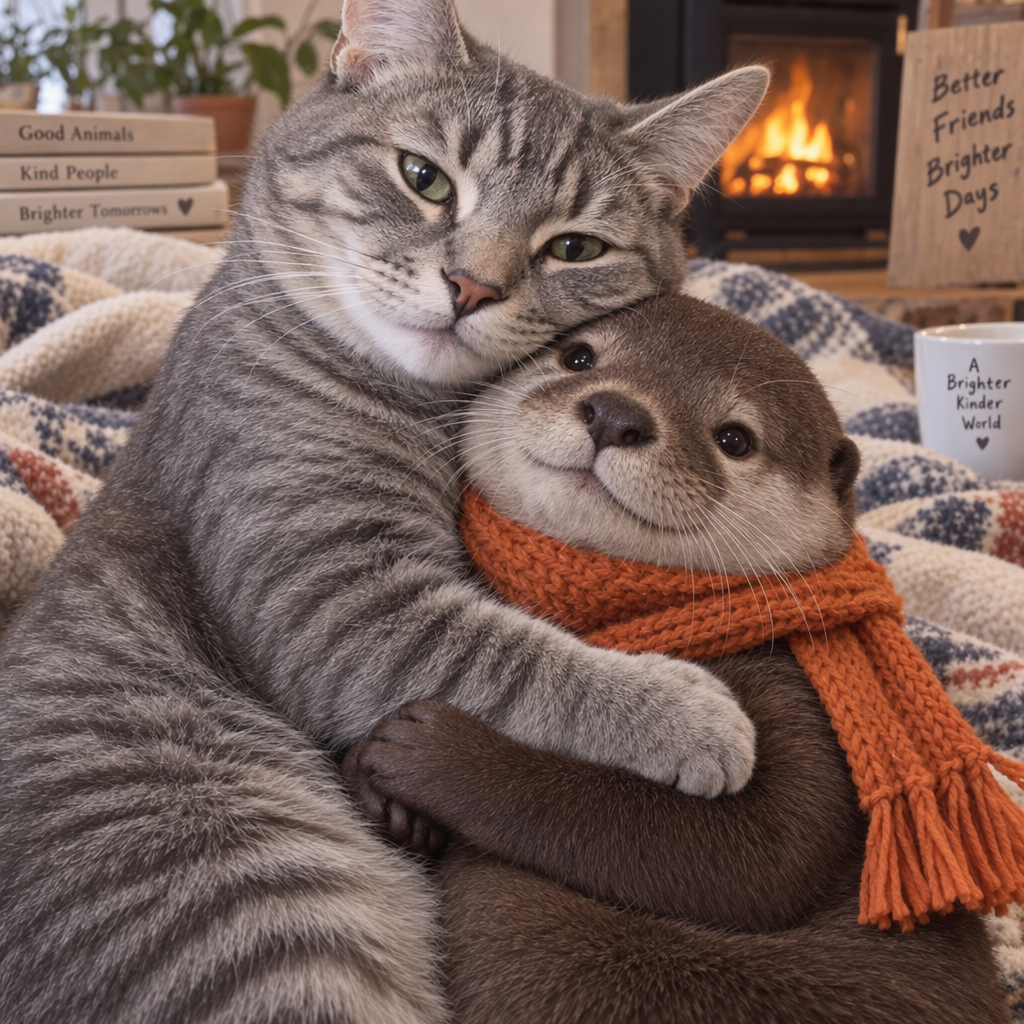 |
| “Now make it look realistic” | 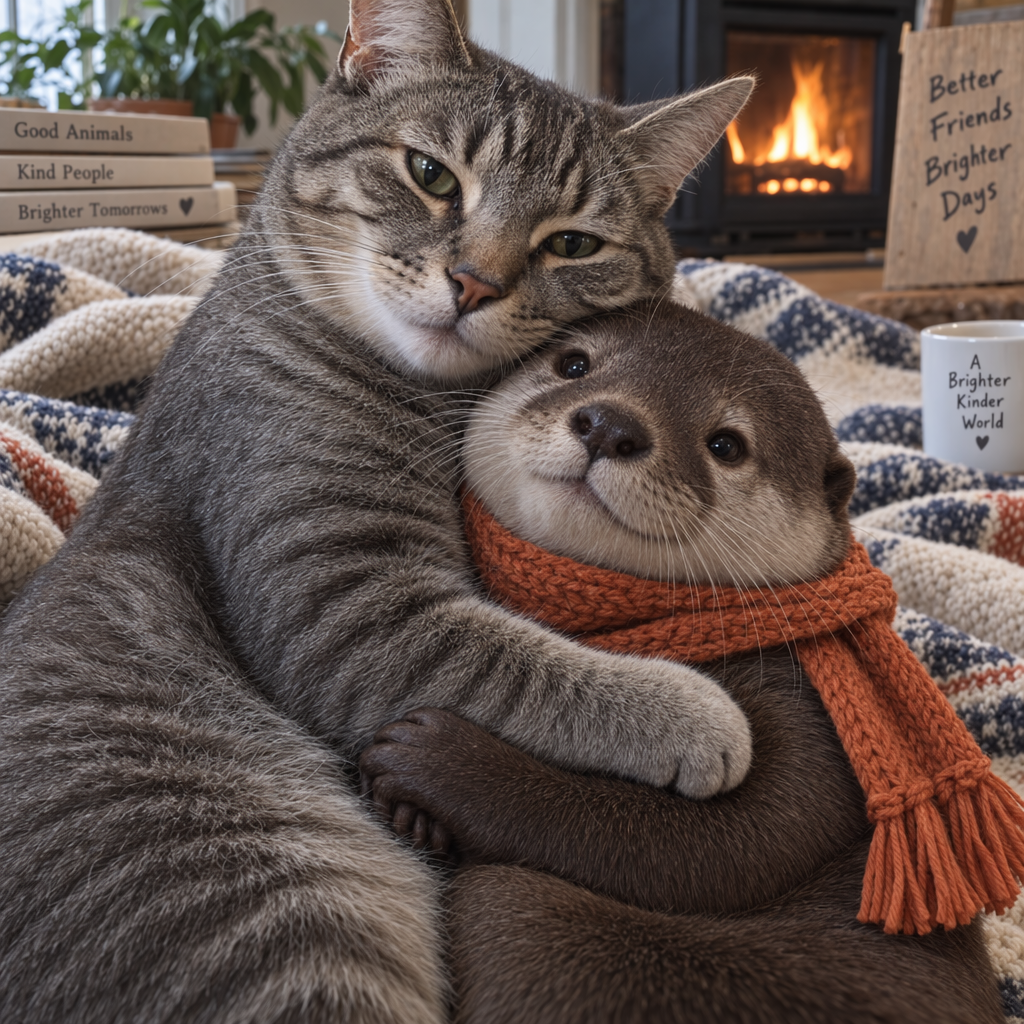 |
流式传输
Responses API 和 Image API 均支持流式图像生成。你可以在 API 生成图像的同时流式获取局部图像,提供更具互动性的体验。
调整 partial_images 参数,可接收 0–3 张局部图像。
- 如果将
partial_images设为 0,你只会收到最终图像。 - 如果值大于零,而完整图像生成得更快,你可能收不到所请求的全部局部图像。
Responses API
流式传输图像
import OpenAI from "openai";
import fs from "fs";
const openai = new OpenAI();

function saveBase64Image(filename: string, imageBase64: string | null) {
  if (!imageBase64) throw new Error("Image generation returned no image.");
  const imageBuffer = Buffer.from(imageBase64, "base64");
  fs.writeFileSync(filename, imageBuffer);
}

const stream = await openai.responses.create({
  model: "gpt-6.2-astra",
  input:
    "Draw a gorgeous image of a river made of white owl feathers, snaking its way through a serene winter landscape",
  stream: true,
  tools: [
    { type: "image_generation", model: "gpt-image-2.5-sunburst", partial_images: 2 },
  ],
});

for await (const event of stream) {
  if (event.type === "response.image_generation_call.partial_image") {
    const idx = event.partial_image_index;
    saveBase64Image(`river-partial-${idx}.png`, event.partial_image_b64);
  } else if (event.type === "response.completed") {
    const imageData = event.response.output
      .filter((output) => output.type === "image_generation_call")
      .map((output) => output.result);

    if (imageData.length > 0) {
      saveBase64Image("river-final.png", imageData[0]);
    }
  }
}
from openai import OpenAI
import base64
client = OpenAI()
def save_base64_image(filename, image_base64):
image_bytes = base64.b64decode(image_base64)
with open(filename, "wb") as f:
f.write(image_bytes)
stream = client.responses.create(
model="gpt-6.2-astra",
input="Draw a gorgeous image of a river made of white owl feathers, snaking its way through a serene winter landscape",
stream=True,
tools=[
{"type": "image_generation", "model": "gpt-image-2.5-sunburst", "partial_images": 2}
],
)
for event in stream:
if event.type == "response.image_generation_call.partial_image":
idx = event.partial_image_index
save_base64_image(f"river-partial-{idx}.png", event.partial_image_b64)
elif event.type == "response.completed":
image_data = [
output.result
for output in event.response.output
if output.type == "image_generation_call"
]
if image_data:
save_base64_image("river-final.png", image_data[0])package main
import (
"context"
"encoding/base64"
"fmt"
"os"
"github.com/openai/openai-go/v3"
"github.com/openai/openai-go/v3/responses"
)
func main() {
client := openai.NewClient()
stream := client.Responses.NewStreaming(context.Background(), responses.ResponseNewParams{
Model: "gpt-6.2-astra",
Input: responses.ResponseNewParamsInputUnion{
OfString: openai.String("Draw a gorgeous image of a river made of white owl feathers, snaking its way through a serene winter landscape"),
},
Tools: []responses.ToolUnionParam{{OfImageGeneration: &responses.ToolImageGenerationParam{Model: "gpt-image-2.5-sunburst", PartialImages: openai.Int(2)}}},
})
for stream.Next() {
event := stream.Current()
if event.Type == "response.image_generation_call.partial_image" {
partial := event.AsResponseImageGenerationCallPartialImage()
saveImage(fmt.Sprintf("river-partial-%d.png", partial.PartialImageIndex), partial.PartialImageB64)
}
if event.Type == "response.completed" {
for _, output := range event.AsResponseCompleted().Response.Output {
if output.Type == "image_generation_call" {
saveImage("river-final.png", output.AsImageGenerationCall().Result)
}
}
}
}
if err := stream.Err(); err != nil {
panic(err)
}
}
func saveImage(filename, encoded string) {
image, err := base64.StdEncoding.DecodeString(encoded)
if err != nil {
panic(err)
}
if err := os.WriteFile(filename, image, 0o600); err != nil {
panic(err)
}
}using OpenAI.Responses;
#pragma warning disable OPENAI001
string key = Environment.GetEnvironmentVariable("OPENAI_API_KEY")!;
ResponsesClient client = new(key);
CreateResponseOptions options = new() { Model = "gpt-6.2-astra", StreamingEnabled = true };
options.InputItems.Add(ResponseItem.CreateUserMessageItem("Draw a gorgeous image of a river made of white owl feathers, snaking its way through a serene winter landscape"));
options.Tools.Add(new ImageGenerationTool { Model = "gpt-image-2.5-sunburst", PartialImageCount = 2 });
bool completed = false;
await foreach (StreamingResponseUpdate update in client.CreateResponseStreamingAsync(options))
{
if (update is StreamingResponseImageGenerationCallPartialImageUpdate partial)
await File.WriteAllBytesAsync($"river-partial-{partial.PartialImageIndex}.png", partial.PartialImageBytes.ToArray());
else if (update is StreamingResponseCompletedUpdate final)
{
ImageGenerationCallResponseItem image = final.Response.OutputItems.OfType<ImageGenerationCallResponseItem>().FirstOrDefault()
?? throw new InvalidOperationException("No generated image was returned.");
await File.WriteAllBytesAsync("river-final.png", image.ImageResultBytes.ToArray());
completed = true;
}
}
if (!completed) throw new InvalidOperationException("Image generation did not complete.");require "base64"
require "openai"
client = OpenAI::Client.new
stream = client.responses.stream(
model: "gpt-6.2-astra",
input: "Generate an image of a river made of white owl feathers.",
tools: [
{
type: :image_generation,
model: "gpt-image-2.5-sunburst",
partial_images: 2
}
]
)
stream.each do |event|
case event
when OpenAI::Models::Responses::ResponseImageGenCallPartialImageEvent
image = Base64.strict_decode64(event.partial_image_b64)
File.binwrite("river-partial-#{event.partial_image_index}.png", image)
when OpenAI::Models::Responses::ResponseCompletedEvent
image_call = event.response.output.find do |item|
item.is_a?(OpenAI::Models::Responses::ResponseOutputItem::ImageGenerationCall)
end
next unless image_call.is_a?(OpenAI::Models::Responses::ResponseOutputItem::ImageGenerationCall)
File.binwrite(
"river-final.png",
Base64.strict_decode64(image_call.result)
)
end
endImage API
流式传输图像
import fs from "fs";
import OpenAI from "openai";

const openai = new OpenAI();

const prompt =
  "Draw a gorgeous image of a river made of white owl feathers, snaking its way through a serene winter landscape";
const stream = await openai.images.generate({
  prompt: prompt,
  model: "gpt-image-2.5-sunburst",
  stream: true,
  partial_images: 2,
});

for await (const event of stream) {
  if (event.type === "image_generation.partial_image") {
    const idx = event.partial_image_index;
    const imageBase64 = event.b64_json;
    if (!imageBase64) throw new Error("Image generation returned no image.");
    const imageBuffer = Buffer.from(imageBase64, "base64");
    fs.writeFileSync(`river${idx}.png`, imageBuffer);
  }
}
from openai import OpenAI
import base64
client = OpenAI()
stream = client.images.generate(
prompt="Draw a gorgeous image of a river made of white owl feathers, snaking its way through a serene winter landscape",
model="gpt-image-2.5-sunburst",
stream=True,
partial_images=2,
)
for event in stream:
if event.type == "image_generation.partial_image":
idx = event.partial_image_index
image_base64 = event.b64_json
image_bytes = base64.b64decode(image_base64)
with open(f"river{idx}.png", "wb") as f:
f.write(image_bytes)package main
import (
"context"
"encoding/base64"
"fmt"
"os"
"github.com/openai/openai-go/v3"
)
func main() {
client := openai.NewClient()
stream := client.Images.GenerateStreaming(context.Background(), openai.ImageGenerateParams{
Model: openai.ImageModel("gpt-image-2.5-sunburst"),
Prompt: "Draw a gorgeous image of a river made of white owl feathers, snaking its way through a serene winter landscape",
PartialImages: openai.Int(2),
})
for stream.Next() {
event := stream.Current()
if event.Type != "image_generation.partial_image" {
continue
}
partial := event.AsImageGenerationPartialImage()
saveImage(fmt.Sprintf("river%d.png", partial.PartialImageIndex), partial.B64JSON)
}
if err := stream.Err(); err != nil {
panic(err)
}
}
func saveImage(filename, encoded string) {
image, err := base64.StdEncoding.DecodeString(encoded)
if err != nil {
panic(err)
}
if err := os.WriteFile(filename, image, 0o600); err != nil {
panic(err)
}
}import com.openai.client.okhttp.OpenAIOkHttpClient;
import com.openai.models.images.ImageGenerateParams;
import java.nio.file.Files;
import java.nio.file.Path;
import java.util.Base64;
var params =
ImageGenerateParams.builder()
.prompt(
"Draw a gorgeous image of a river made of white owl feathers, snaking its way through a serene winter landscape")
.model("gpt-image-2.5-sunburst")
.partialImages(2)
.build();
try (var stream = client.images().generateStreaming(params)) {
var events = stream.stream().iterator();
while (events.hasNext()) {
var event = events.next();
if (event.generationPartialImage().isPresent()) {
var partial = event.generationPartialImage().orElseThrow();
Files.write(
Path.of("river" + partial.partialImageIndex() + ".png"),
Base64.getDecoder().decode(partial.b64Json()));
}
}
}require "base64"
require "openai"
client = OpenAI::Client.new
stream = client.images.generate_stream_raw(
model: "gpt-image-2.5-sunburst",
prompt: "A river made of white owl feathers in a winter landscape",
partial_images: 2
)
stream.each do |event|
next unless event.is_a?(OpenAI::Models::ImageGenPartialImageEvent)
image = Base64.strict_decode64(event.b64_json)
File.binwrite("river#{event.partial_image_index}.png", image)
end结果
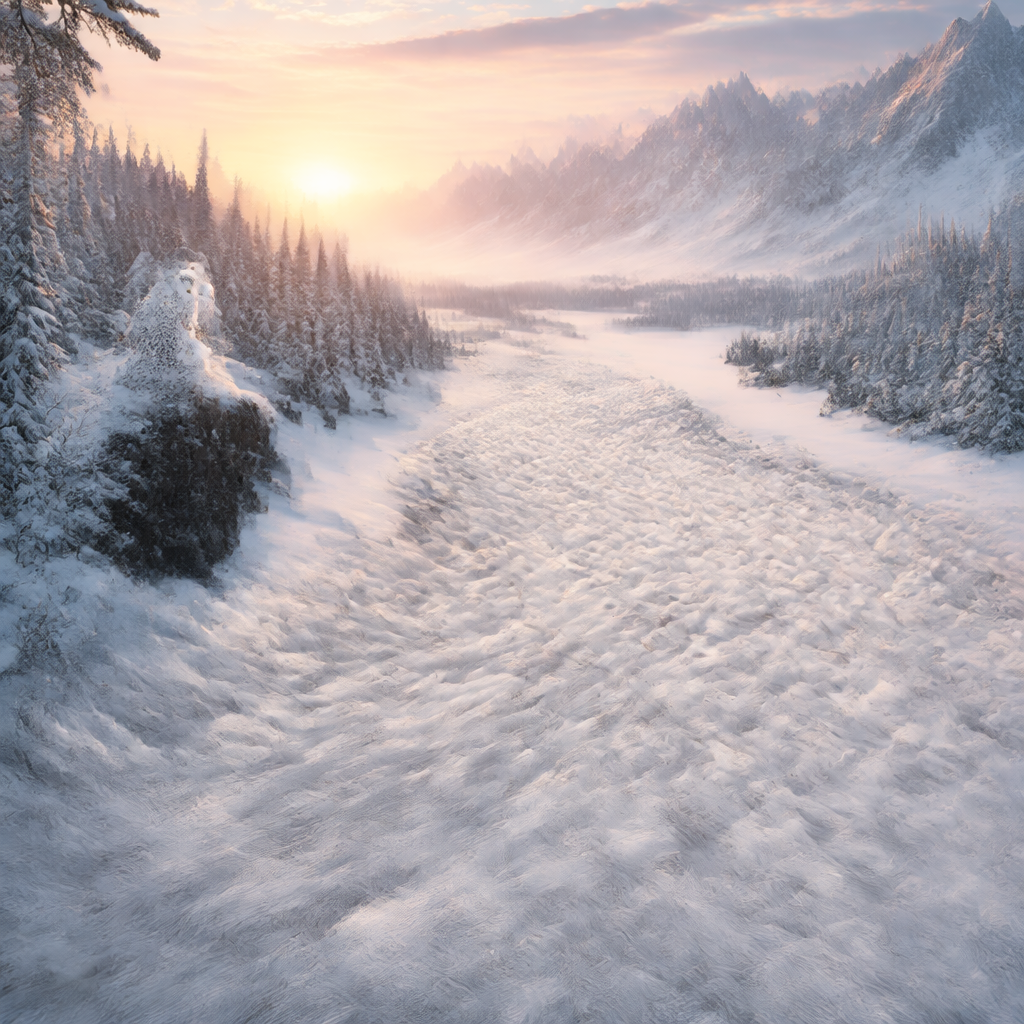
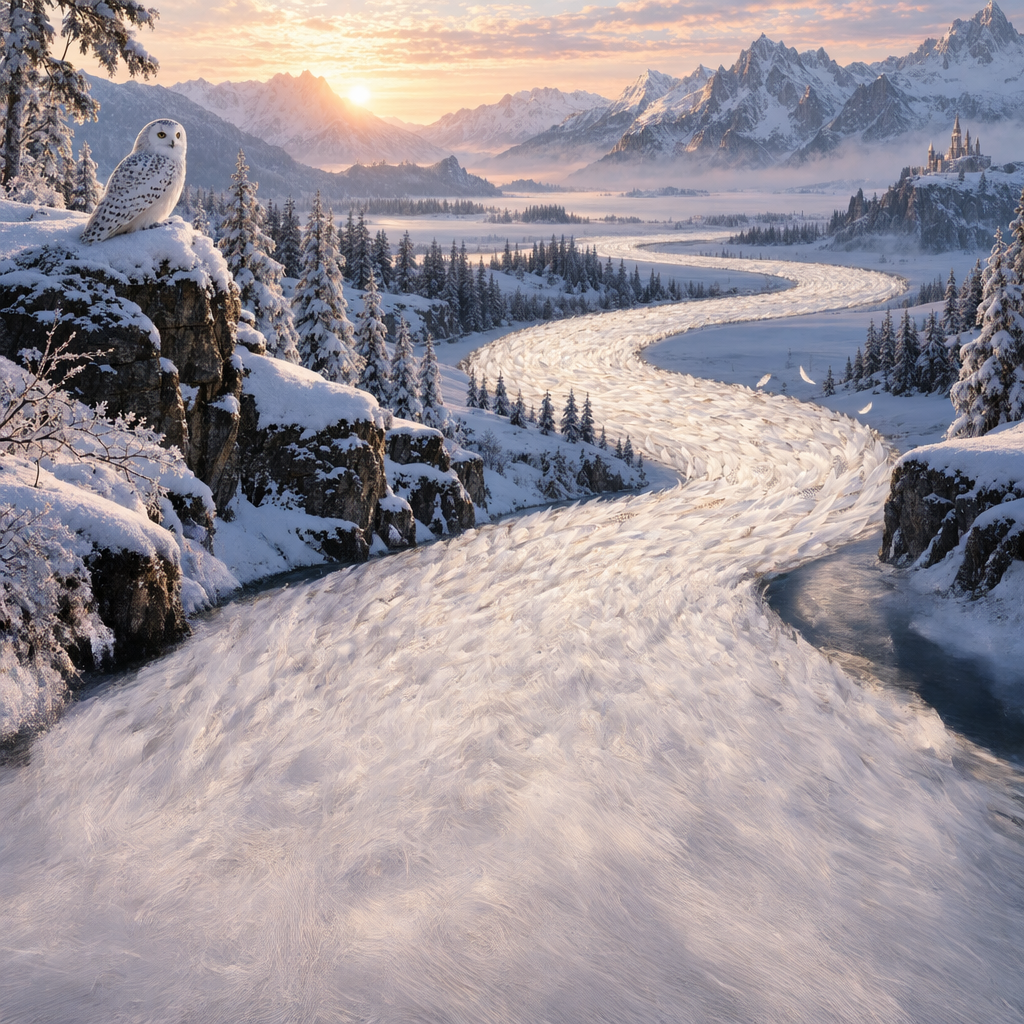
| 局部图像 1 | 局部图像 2 | 最终图像 |
|---|---|---|
 |
 |
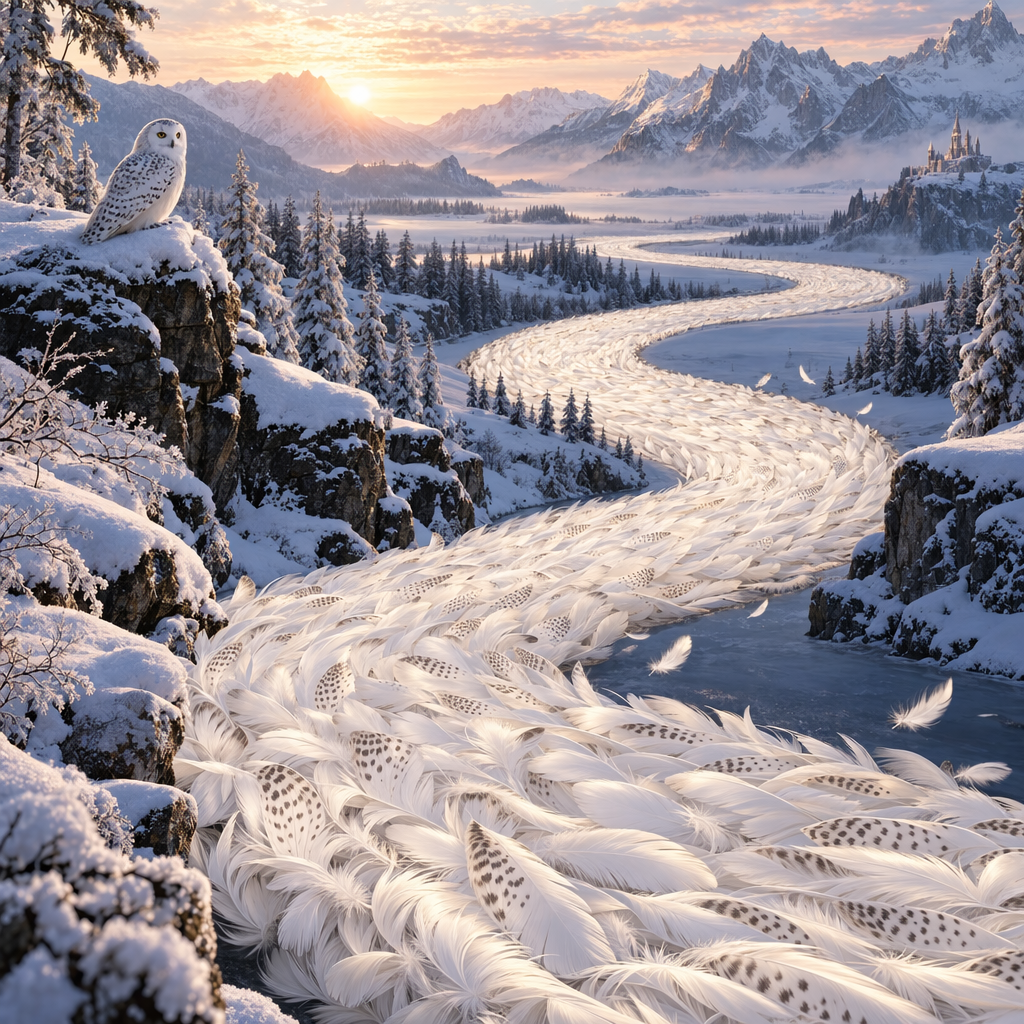 |
提示词:Draw a gorgeous image of a river made of white owl feathers, snaking its way through a serene winter landscape
修订后的提示词
在 Responses API 中使用图像生成工具时,主线模型(例如 gpt-5.5)会自动修订你的提示词,以改善表现。
你可以通过图像生成调用的 revised_prompt 字段,获取修订后的提示词:
修订后的提示词响应
{
  "id": "ig_123",
  "type": "image_generation_call",
  "status": "completed",
  "revised_prompt": "A gray tabby cat hugging an otter. The otter is wearing an orange scarf. Both animals are cute and friendly, depicted in a warm, heartwarming style.",
  "result": "..."
}
编辑图像
图像编辑端点允许你:
- 编辑现有图像
- 将其他图像作为参考,生成新图像
- 上传图像和用于标识替换区域的蒙版,编辑图像的局部
使用参考图像创建新图像
你可以使用一张或多张图像作为参考,生成新图像。
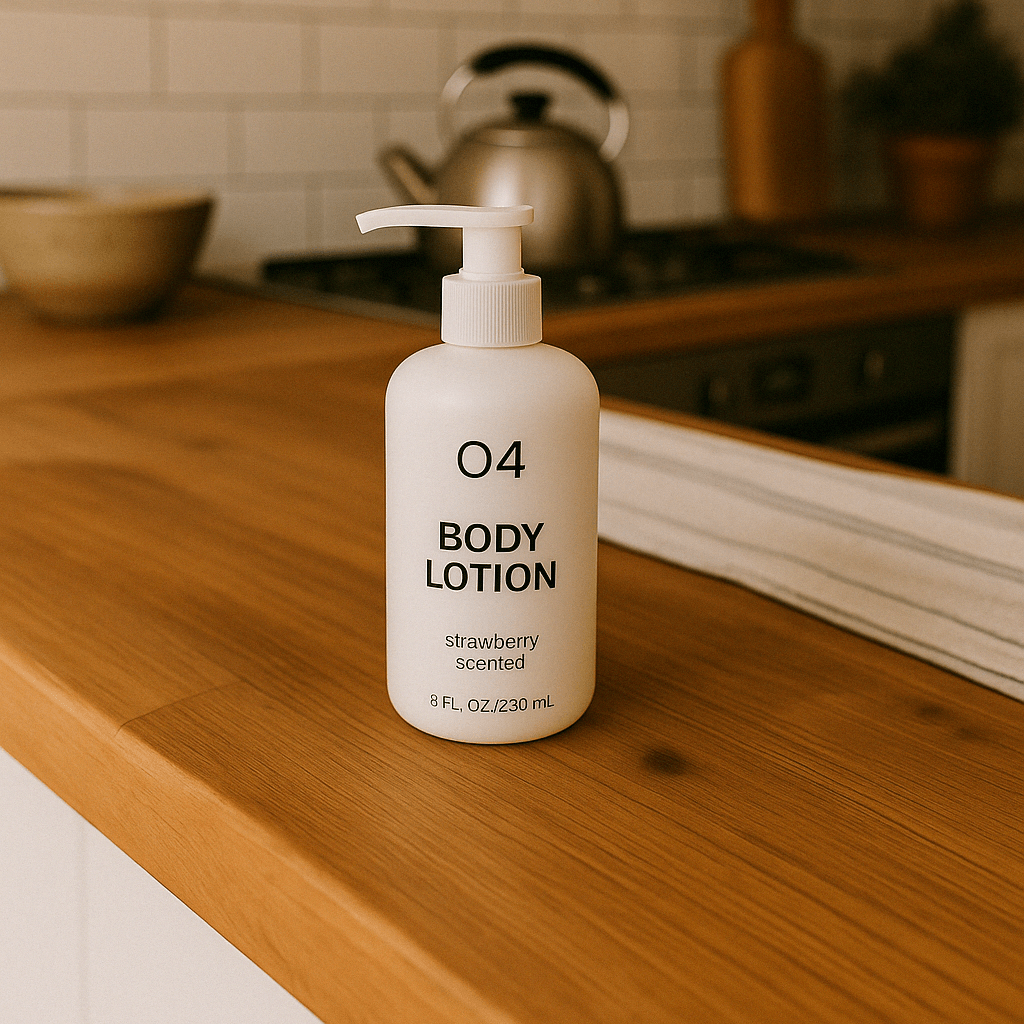
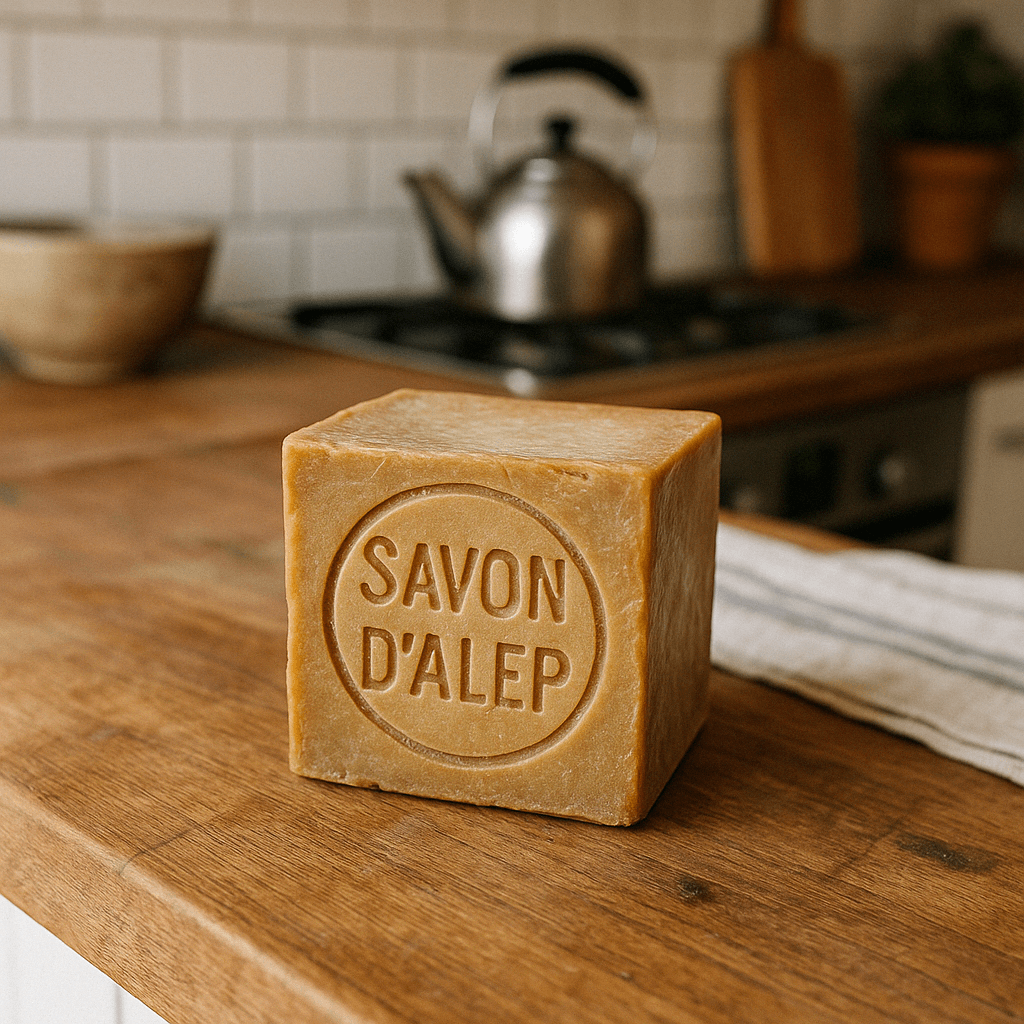
在这个示例中,我们将使用 4 张输入图像,生成一张包含参考图像中物品的礼篮图像。
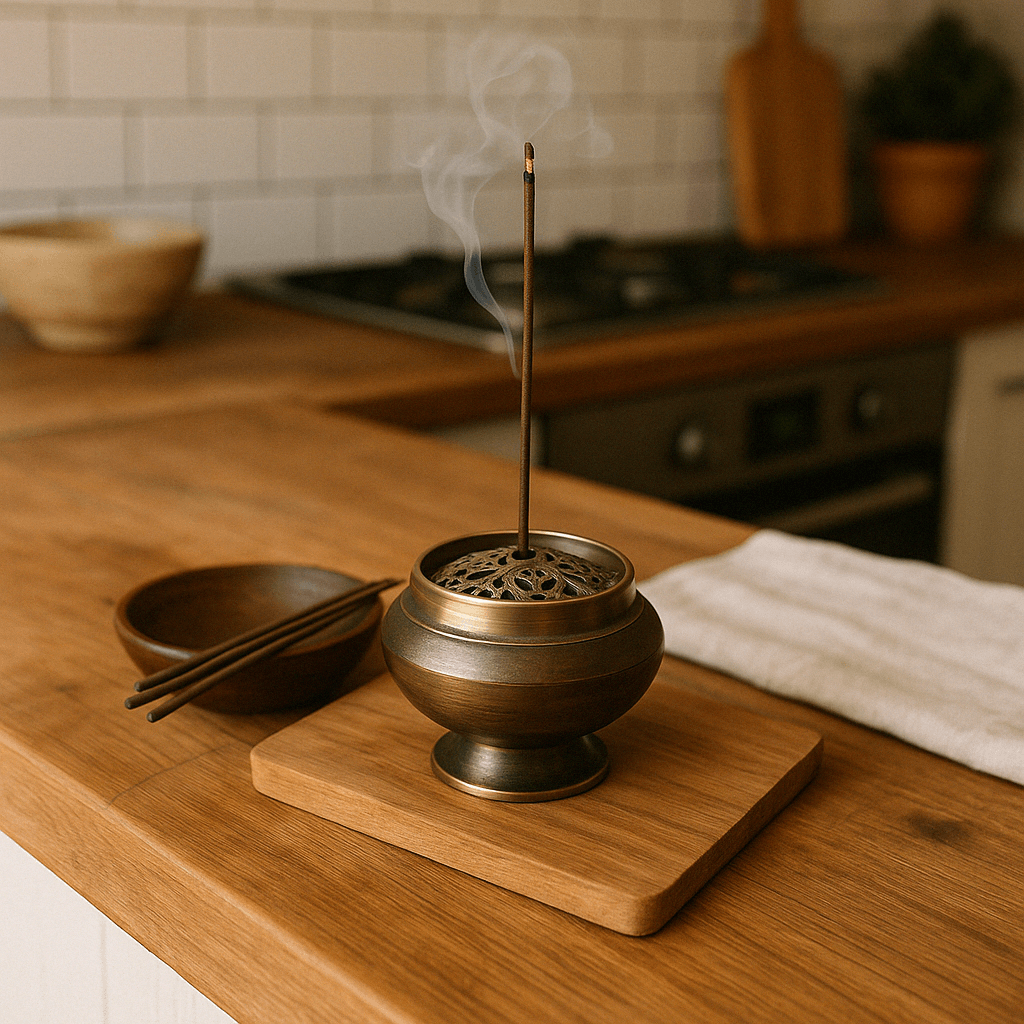
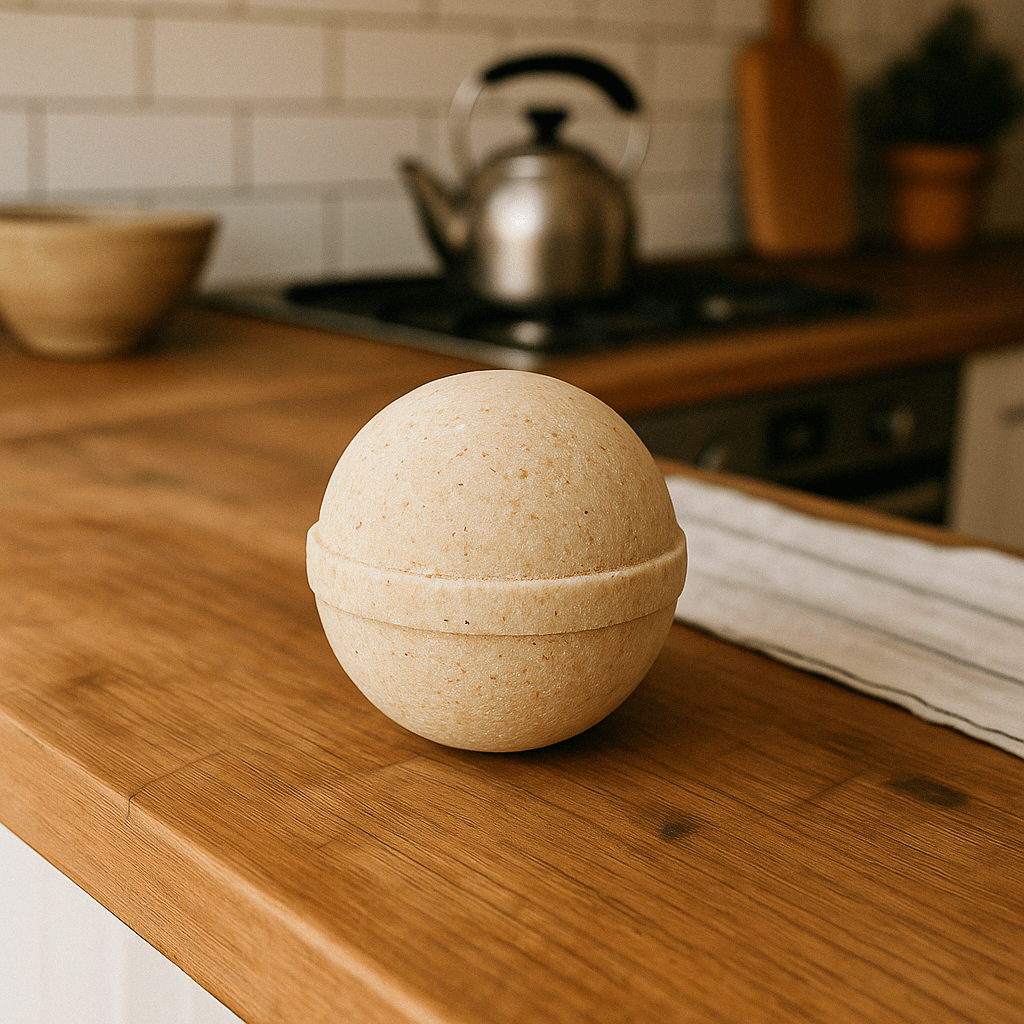

Responses API
使用 Responses API 时,你可以通过 3 种方式提供输入图像:
- 提供完整 URL
- 将图像作为 Base64 编码的 data URL 提供
- 提供文件 ID(通过 Files API 创建)
创建文件
创建文件
import fs from "fs";
import OpenAI from "openai";

const openai = new OpenAI();

async function createFile(filePath: fs.PathLike) {
  const fileContent = fs.createReadStream(filePath);
  const result = await openai.files.create({
    file: fileContent,
    purpose: "vision",
  });
  return result.id;
}
from openai import OpenAI
client = OpenAI()
def create_file(file_path):
with open(file_path, "rb") as file_content:
result = client.files.create(
file=file_content,
purpose="vision",
)
return result.idpackage main
import (
"context"
"fmt"
"os"
"github.com/openai/openai-go/v3"
)
func main() {
client := openai.NewClient()
file, err := os.Open("image.png")
if err != nil {
panic(err)
}
defer file.Close()
uploaded, err := client.Files.New(context.Background(), openai.FileNewParams{
File: file,
Purpose: openai.FilePurposeVision,
})
if err != nil {
panic(err)
}
fmt.Println(uploaded.ID)
}import com.openai.client.OpenAIClient;
import com.openai.client.okhttp.OpenAIOkHttpClient;
import com.openai.models.files.FileCreateParams;
import com.openai.models.files.FilePurpose;
import java.nio.file.Path;
var file =
client
.files()
.create(
FileCreateParams.builder()
.file(Path.of(System.getenv("OPENAI_EXAMPLE_FILE_PATH")))
.purpose(FilePurpose.VISION)
.build());
System.out.println(file.id());using OpenAI.Files;
#pragma warning disable OPENAI001
string key = Environment.GetEnvironmentVariable("OPENAI_API_KEY")!;
OpenAIFileClient client = new(key);
OpenAIFile file = await client.UploadFileAsync("cat_and_otter.png", FileUploadPurpose.Vision);
Console.WriteLine(file.Id);require "openai"
require "pathname"
client = OpenAI::Client.new
file = client.files.create(
file: Pathname("image.png"),
purpose: OpenAI::Models::FilePurpose::VISION
)
puts(file.id)创建 base64 编码的图像
创建 base64 编码的图像
import fs from "fs";

function encodeImage(filePath: fs.PathOrFileDescriptor) {
  const base64Image = fs.readFileSync(filePath, "base64");
  return base64Image;
}
import base64
def encode_image(file_path):
with open(file_path, "rb") as f:
base64_image = base64.b64encode(f.read()).decode("utf-8")
return base64_imagepackage main
import (
"encoding/base64"
"fmt"
"os"
)
func main() {
image, err := os.ReadFile("image.png")
if err != nil {
panic(err)
}
fmt.Println(base64.StdEncoding.EncodeToString(image))
}import java.nio.file.Files;
import java.nio.file.Path;
import java.util.Base64;
System.out.println(encodeImage(Path.of("example.png")));
private static String encodeImage(Path path) throws java.io.IOException {
return Base64.getEncoder().encodeToString(Files.readAllBytes(path));
}using System;
Console.WriteLine(EncodeImage("example.png"));
static string EncodeImage(string filePath) => Convert.ToBase64String(File.ReadAllBytes(filePath));require "base64"
image = File.binread("image.png")
puts(Base64.strict_encode64(image))编辑图像
import fs from "fs";
import OpenAI from "openai";

const openai = new OpenAI();

function encodeImage(filePath: fs.PathOrFileDescriptor) {
  return fs.readFileSync(filePath, "base64");
}

async function createFile(filePath: fs.PathLike) {
  const result = await openai.files.create({
    file: fs.createReadStream(filePath),
    purpose: "vision",
  });
  return result.id;
}

const prompt = `Generate a photorealistic image of a gift basket on a white background
labeled 'Relax & Unwind' with a ribbon and handwriting-like font,
containing all the items in the reference pictures.`;

const base64Image1 = encodeImage("fixtures/body-lotion.png");
const base64Image2 = encodeImage("fixtures/soap.png");
const fileId1 = await createFile("fixtures/bath-bomb.png");
const fileId2 = await createFile("fixtures/incense-kit.png");

const response = await openai.responses.create({
  model: "gpt-6.2-astra",
  input: [
    {
      role: "user",
      content: [
        { type: "input_text", text: prompt },
        {
          type: "input_image",
          image_url: `data:image/png;base64,${base64Image1}`,
          detail: "auto",
        },
        {
          type: "input_image",
          image_url: `data:image/png;base64,${base64Image2}`,
          detail: "auto",
        },
        {
          type: "input_image",
          file_id: fileId1,
          detail: "auto",
        },
        {
          type: "input_image",
          file_id: fileId2,
          detail: "auto",
        },
      ],
    },
  ],
  tools: [{ type: "image_generation", model: "gpt-image-2.5-sunburst" }],
});

const imageData = response.output
  .filter((output) => output.type === "image_generation_call")
  .map((output) => output.result);

if (imageData.length > 0) {
  const imageBase64 = imageData[0];
  if (!imageBase64) throw new Error("Image generation returned no image.");
  fs.writeFileSync("gift-basket.png", Buffer.from(imageBase64, "base64"));
} else {
  console.log(response.output_text);
}
from openai import OpenAI
import base64
client = OpenAI()
def encode_image(file_path):
with open(file_path, "rb") as image_file:
return base64.b64encode(image_file.read()).decode("utf-8")
def create_file(file_path):
with open(file_path, "rb") as file_content:
result = client.files.create(file=file_content, purpose="vision")
return result.id
prompt = """Generate a photorealistic image of a gift basket on a white background
labeled 'Relax & Unwind' with a ribbon and handwriting-like font,
containing all the items in the reference pictures."""
base64_image1 = encode_image("body-lotion.png")
base64_image2 = encode_image("soap.png")
file_id1 = create_file("bath-bomb.png")
file_id2 = create_file("incense-kit.png")
response = client.responses.create(
model="gpt-6.2-astra",
input=[
{
"role": "user",
"content": [
{"type": "input_text", "text": prompt},
{
"type": "input_image",
"image_url": f"data:image/png;base64,{base64_image1}",
},
{
"type": "input_image",
"image_url": f"data:image/png;base64,{base64_image2}",
},
{
"type": "input_image",
"file_id": file_id1,
},
{
"type": "input_image",
"file_id": file_id2,
},
],
}
],
tools=[{"type": "image_generation", "model": "gpt-image-2.5-sunburst"}],
)
image_generation_calls = [
output for output in response.output if output.type == "image_generation_call"
]
image_data = [output.result for output in image_generation_calls]
if image_data:
image_base64 = image_data[0]
with open("gift-basket.png", "wb") as f:
f.write(base64.b64decode(image_base64))
else:
print(response.output_text)package main
import (
"context"
"encoding/base64"
"os"
"github.com/openai/openai-go/v3"
"github.com/openai/openai-go/v3/responses"
)
func main() {
client := openai.NewClient()
bathBombID := uploadImage(client, "bath-bomb.png")
incenseKitID := uploadImage(client, "incense-kit.png")
response, err := client.Responses.New(context.Background(), responses.ResponseNewParams{
Model: "gpt-6.2-astra",
Input: responses.ResponseNewParamsInputUnion{OfInputItemList: responses.ResponseInputParam{
responses.ResponseInputItemParamOfMessage(
responses.ResponseInputMessageContentListParam{
responses.ResponseInputContentParamOfInputText("Generate a photorealistic image of a gift basket on a white background labeled 'Relax & Unwind' with a ribbon and handwriting-like font, containing all the items in the reference pictures."),
{OfInputImage: &responses.ResponseInputImageParam{ImageURL: openai.String(dataURL("body-lotion.png")), Detail: responses.ResponseInputImageDetailAuto}},
{OfInputImage: &responses.ResponseInputImageParam{ImageURL: openai.String(dataURL("soap.png")), Detail: responses.ResponseInputImageDetailAuto}},
{OfInputImage: &responses.ResponseInputImageParam{FileID: openai.String(bathBombID), Detail: responses.ResponseInputImageDetailAuto}},
{OfInputImage: &responses.ResponseInputImageParam{FileID: openai.String(incenseKitID), Detail: responses.ResponseInputImageDetailAuto}},
},
responses.EasyInputMessageRoleUser,
),
}},
Tools: []responses.ToolUnionParam{{OfImageGeneration: &responses.ToolImageGenerationParam{Model: "gpt-image-2.5-sunburst"}}},
})
if err != nil {
panic(err)
}
saveFirstGeneratedImage(response, "gift-basket.png")
}
func uploadImage(client openai.Client, filename string) string {
file, err := os.Open(filename)
if err != nil {
panic(err)
}
defer file.Close()
uploaded, err := client.Files.New(context.Background(), openai.FileNewParams{File: file, Purpose: openai.FilePurposeVision})
if err != nil {
panic(err)
}
return uploaded.ID
}
func dataURL(filename string) string {
image, err := os.ReadFile(filename)
if err != nil {
panic(err)
}
return "data:image/png;base64," + base64.StdEncoding.EncodeToString(image)
}
func saveFirstGeneratedImage(response *responses.Response, filename string) {
for _, output := range response.Output {
if output.Type != "image_generation_call" {
continue
}
image, err := base64.StdEncoding.DecodeString(output.AsImageGenerationCall().Result)
if err != nil {
panic(err)
}
if err := os.WriteFile(filename, image, 0o600); err != nil {
panic(err)
}
return
}
panic("response did not include an image generation call")
}using OpenAI.Files;
using OpenAI.Responses;
#pragma warning disable OPENAI001
string key = Environment.GetEnvironmentVariable("OPENAI_API_KEY")!;
ResponsesClient client = new(key);
OpenAIFileClient files = new(key);
OpenAIFile bathBomb = await files.UploadFileAsync("bath-bomb.png", FileUploadPurpose.Vision);
OpenAIFile incense = await files.UploadFileAsync("incense-kit.png", FileUploadPurpose.Vision);
CreateResponseOptions options = new("gpt-6.2-astra", [ResponseItem.CreateUserMessageItem([
ResponseContentPart.CreateInputTextPart("Generate a photorealistic image of a gift basket on a white background labeled 'Relax & Unwind' with a ribbon and handwriting-like font, containing all the items in the reference pictures."),
ResponseContentPart.CreateInputImagePart(BinaryData.FromBytes(await File.ReadAllBytesAsync("body-lotion.png"), "image/png")),
ResponseContentPart.CreateInputImagePart(BinaryData.FromBytes(await File.ReadAllBytesAsync("soap.png"), "image/png")),
ResponseContentPart.CreateInputImagePart(bathBomb.Id),
ResponseContentPart.CreateInputImagePart(incense.Id),
])]);
options.Tools.Add(new ImageGenerationTool { Model = "gpt-image-2.5-sunburst" });
ResponseResult response = await client.CreateResponseAsync(options);
ImageGenerationCallResponseItem image = response.OutputItems.OfType<ImageGenerationCallResponseItem>().First();
await File.WriteAllBytesAsync("gift-basket.png", image.ImageResultBytes.ToArray());require "base64"
require "openai"
require "pathname"
client = OpenAI::Client.new
base64_images = ["body-lotion.png", "soap.png"].map do |path|
Base64.strict_encode64(File.binread(path))
end
file_ids = [
client.files.create(file: Pathname("bath-bomb.png"), purpose: :vision).id,
client.files.create(file: Pathname("incense-kit.png"), purpose: :vision).id
]
prompt = <<~PROMPT
Generate a photorealistic image of a gift basket on a white background
labeled 'Relax & Unwind' with a ribbon and handwriting-like font,
containing all the items in the reference pictures.
PROMPT
response = client.responses.create(
model: "gpt-6.2-astra",
input: [
{
role: :user,
content: [
{
type: :input_text,
text: prompt
},
*base64_images.map do |image|
{
type: :input_image,
image_url: "data:image/png;base64,#{image}"
}
end,
*file_ids.map do |file_id|
{
type: :input_image,
file_id: file_id
}
end
]
}
],
tools: [
{
type: :image_generation,
model: "gpt-image-2.5-sunburst"
}
]
)
image_call = response.output.find do |item|
item.is_a?(OpenAI::Models::Responses::ResponseOutputItem::ImageGenerationCall)
end
unless image_call.is_a?(OpenAI::Models::Responses::ResponseOutputItem::ImageGenerationCall)
raise "No image generation call returned"
end
File.binwrite("gift-basket.png", Base64.strict_decode64(image_call.result))Image API
编辑图像
import fs from "fs";
import OpenAI, { toFile } from "openai";

const client = new OpenAI();

const prompt = `
Generate a photorealistic image of a gift basket on a white background
labeled 'Relax & Unwind' with a ribbon and handwriting-like font,
containing all the items in the reference pictures.
`;

const imageFiles = [
  "fixtures/bath-bomb.png",
  "fixtures/body-lotion.png",
  "fixtures/incense-kit.png",
  "fixtures/soap.png",
];

const images = await Promise.all(
  imageFiles.map(
    async (file) =>
      await toFile(fs.createReadStream(file), null, {
        type: "image/png",
      })
  )
);

const response = await client.images.edit({
  model: "gpt-image-2.5-sunburst",
  image: images,
  prompt,
});

// Save the image to a file
const image_base64 = response.data?.[0]?.b64_json;
if (!image_base64) throw new Error("Image generation returned no image.");
const image_bytes = Buffer.from(image_base64, "base64");
fs.writeFileSync("basket.png", image_bytes);
import base64
from openai import OpenAI
client = OpenAI()
prompt = """
Generate a photorealistic image of a gift basket on a white background
labeled 'Relax & Unwind' with a ribbon and handwriting-like font,
containing all the items in the reference pictures.
"""
result = client.images.edit(
model="gpt-image-2.5-sunburst",
image=[
open("body-lotion.png", "rb"),
open("bath-bomb.png", "rb"),
open("incense-kit.png", "rb"),
open("soap.png", "rb"),
],
prompt=prompt,
)
image_base64 = result.data[0].b64_json
image_bytes = base64.b64decode(image_base64)
# Save the image to a file
with open("gift-basket.png", "wb") as f:
f.write(image_bytes)package main
import (
"context"
"encoding/base64"
"io"
"os"
"github.com/openai/openai-go/v3"
)
func main() {
client := openai.NewClient()
files, closeFiles := openImages(
"bath-bomb.png",
"body-lotion.png",
"incense-kit.png",
"soap.png",
)
defer closeFiles()
response, err := client.Images.Edit(context.Background(), openai.ImageEditParams{
Model: openai.ImageModel("gpt-image-2.5-sunburst"),
Image: openai.ImageEditParamsImageUnion{OfFileArray: files},
Prompt: "Generate a photorealistic image of a gift basket on a white background " +
"labeled 'Relax & Unwind' with a ribbon and handwriting-like font, containing all the items in the reference pictures.",
})
if err != nil {
panic(err)
}
saveImage("basket.png", response.Data[0].B64JSON)
}
func openImages(names ...string) ([]io.Reader, func()) {
images := make([]io.Reader, 0, len(names))
files := make([]*os.File, 0, len(names))
for _, name := range names {
file, err := os.Open(name)
if err != nil {
closeFiles(files)
panic(err)
}
images = append(images, openai.File(file, name, "image/png"))
files = append(files, file)
}
return images, func() { closeFiles(files) }
}
func closeFiles(files []*os.File) {
for _, file := range files {
if err := file.Close(); err != nil {
panic(err)
}
}
}
func saveImage(filename, encoded string) {
image, err := base64.StdEncoding.DecodeString(encoded)
if err != nil {
panic(err)
}
if err := os.WriteFile(filename, image, 0o600); err != nil {
panic(err)
}
}import com.openai.client.OpenAIClient;
import com.openai.client.okhttp.OpenAIOkHttpClient;
import com.openai.core.MultipartField;
import com.openai.models.images.ImageEditParams;
import java.io.IOException;
import java.io.InputStream;
import java.nio.file.Files;
import java.nio.file.Path;
import java.util.Base64;
import java.util.List;
Path lotion = Path.of(System.getenv("OPENAI_EXAMPLE_IMAGE_PATH"));
Path soap = Path.of(System.getenv("OPENAI_EXAMPLE_IMAGE_PATH_2"));
Path bathBomb = Path.of(System.getenv("OPENAI_EXAMPLE_IMAGE_PATH_3"));
Path incense = Path.of(System.getenv("OPENAI_EXAMPLE_IMAGE_PATH_4"));
try (InputStream lotionImage = Files.newInputStream(lotion);
InputStream bathBombImage = Files.newInputStream(bathBomb);
InputStream incenseImage = Files.newInputStream(incense);
InputStream soapImage = Files.newInputStream(soap)) {
var images =
client
.images()
.edit(
ImageEditParams.builder()
.model("gpt-image-2.5-sunburst")
.image(
MultipartField.<ImageEditParams.Image>builder()
.value(
ImageEditParams.Image.ofInputStreams(
List.of(lotionImage, bathBombImage, incenseImage, soapImage)))
.contentType("image/png")
.filename("gift-basket-reference.png")
.build())
.prompt(
"""
Generate a photorealistic image of a gift basket on a white background
labeled 'Relax & Unwind' with a ribbon and handwriting-like font,
containing all the items in the reference pictures.
""")
.build());
Files.write(
Path.of("gift-basket.png"),
Base64.getDecoder().decode(images.data().orElseThrow().get(0).b64Json().orElseThrow()));
}require "base64"
require "openai"
require "pathname"
client = OpenAI::Client.new
images = %w[body-lotion.png bath-bomb.png incense-kit.png soap.png].map do |path|
OpenAI::FilePart.new(Pathname(path), content_type: "image/png")
end
result = client.images.edit(
image: images,
model: "gpt-image-2.5-sunburst",
prompt: <<~PROMPT
Generate a photorealistic image of a gift basket on a white background
labeled 'Relax & Unwind' with a ribbon and handwriting-like font,
containing all the items in the reference pictures.
PROMPT
)
generated_image = result.data&.first or raise "No image returned"
File.binwrite("gift-basket.png", Base64.strict_decode64(generated_image.b64_json))curl -s -D >(grep -i x-request-id >&2) \
-o >(jq -r '.data[0].b64_json' | base64 --decode > gift-basket.png) \
-X POST "https://api.openai.com/v1/images/edits" \
-H "Authorization: Bearer $OPENAI_API_KEY" \
-F "model=gpt-image-2.5-sunburst" \
-F "image[]=@body-lotion.png" \
-F "image[]=@bath-bomb.png" \
-F "image[]=@incense-kit.png" \
-F "image[]=@soap.png" \
-F 'prompt=Generate a photorealistic image of a gift basket on a white background labeled "Relax & Unwind" with a ribbon and handwriting-like font, containing all the items in the reference pictures'openai images edit \
--model gpt-image-2.5-sunburst \
--image body-lotion.png \
--image bath-bomb.png \
--image incense-kit.png \
--image soap.png \
--prompt 'Generate a photorealistic image of a gift basket on a white background labeled "Relax & Unwind" with a ribbon and handwriting-like font, containing all the items in the reference pictures' \
--raw-output \
--transform 'data.0.b64_json' | base64 --decode > gift-basket.png使用标注引导编辑
对于受支持的 GPT-Image-2.5 和 GPT-Image-2.6 模型,使用 Image API 的 POST /v1/images/edits 端点进行标注引导编辑。使用 Responses API 进行区域编辑时,请使用蒙版。通过标注图层指明变化应发生的位置,并在 prompt 中描述变化。
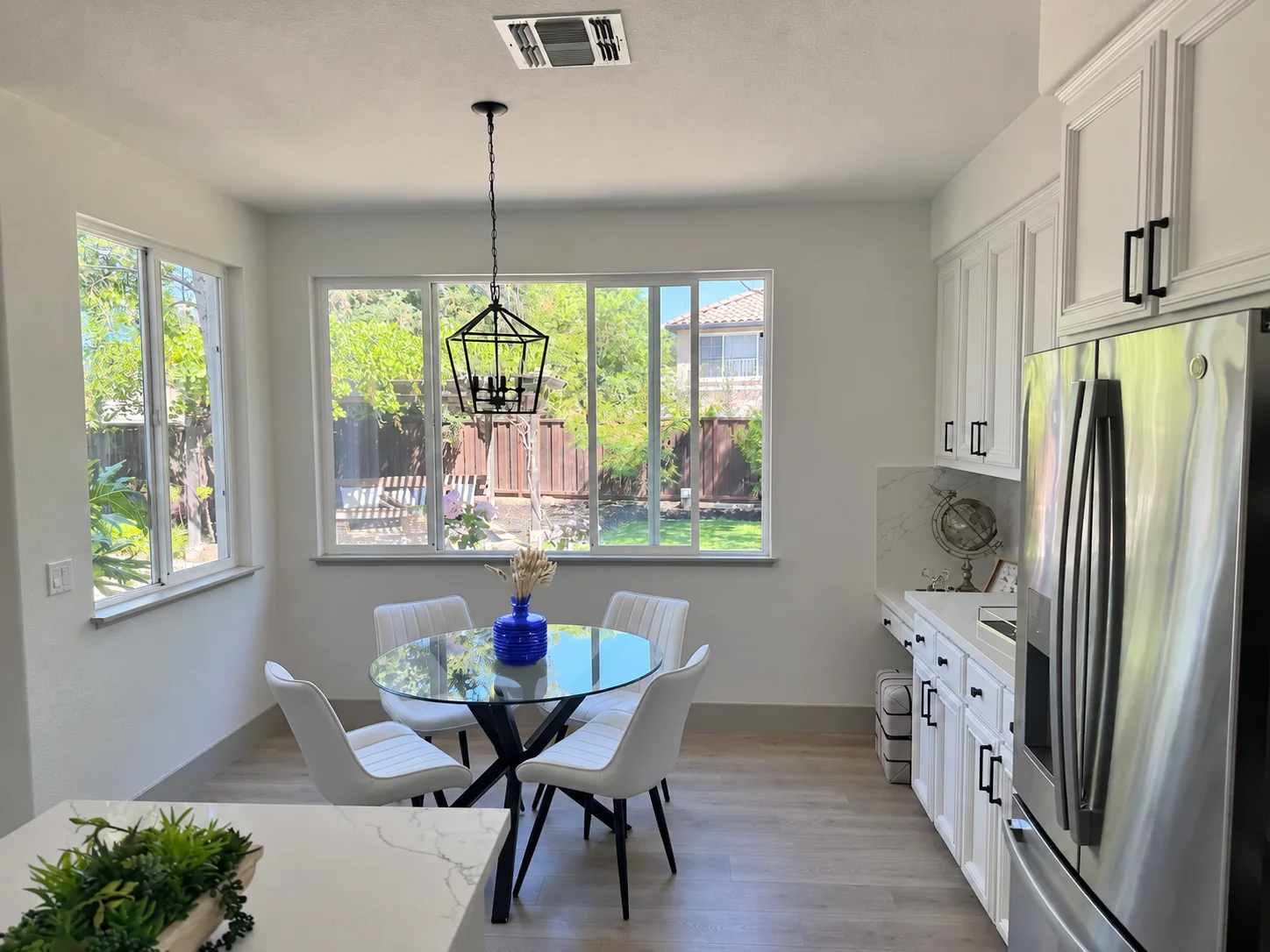
例如,将厨房照片和透明叠加图层下载到同一目录。叠加图层圈出了需要重新着色的花瓶。
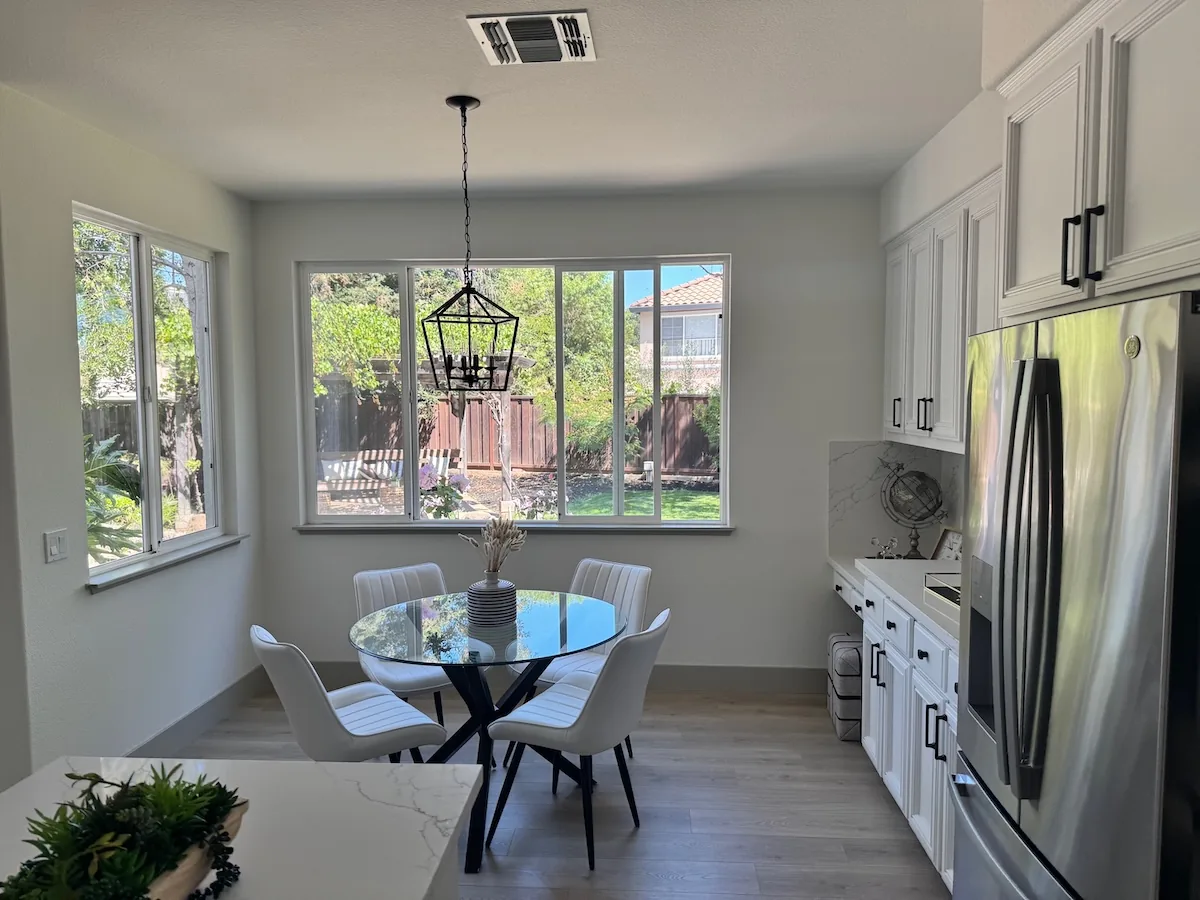

使用 Image API 编辑圈出的花瓶
import { createReadStream } from "node:fs";
import { writeFile } from "node:fs/promises";
import OpenAI, { toFile } from "openai";

const client = new OpenAI();
const response = await client.images.edit({
  model: "gpt-image-2.6-flare",
  image: await toFile(createReadStream("kitchen.webp"), "kitchen.webp", {
    type: "image/webp",
  }),
  markup: await toFile(
    createReadStream("markup-vase-overlay-gpt-image-2-6.png"),
    "markup-vase-overlay-gpt-image-2-6.png",
    { type: "image/png" }
  ),
  quality: "medium",
  prompt:
    "Recolor the striped vase inside the red circle to solid cobalt blue ceramic. " +
    "Keep its shape, the dried stems, and the rest of the kitchen unchanged. " +
    "Remove the red circle from the finished photo.",
});
const encoded = response.data?.[0]?.b64_json;
if (!encoded) throw new Error("Image edit returned no image");
await writeFile("vase.png", Buffer.from(encoded, "base64"));
import base64
from pathlib import Path
from openai import OpenAI
client = OpenAI()
overlay = Path("markup-vase-overlay-gpt-image-2-6.png")
with open("kitchen.webp", "rb") as image, overlay.open("rb") as markup:
result = client.images.edit(
model="gpt-image-2.6-flare",
image=("kitchen.webp", image, "image/webp"),
markup=(overlay.name, markup, "image/png"),
quality="medium",
prompt=(
"Recolor the striped vase inside the red circle to solid cobalt blue ceramic. "
"Keep its shape, the dried stems, and the rest of the kitchen unchanged. "
"Remove the red circle from the finished photo."
),
)
Path("vase.png").write_bytes(base64.b64decode(result.data[0].b64_json))client := openai.NewClient()
image, err := os.Open("kitchen.webp")
if err != nil {
panic(err)
}
defer image.Close()
markup, err := os.Open("markup-vase-overlay-gpt-image-2-6.png")
if err != nil {
panic(err)
}
defer markup.Close()
response, err := client.Images.Edit(context.Background(), openai.ImageEditParams{
Model: openai.ImageModel("gpt-image-2.6-flare"),
Image: openai.ImageEditParamsImageUnion{OfFile: openai.File(image, "kitchen.webp", "image/webp")},
Markup: openai.File(markup, "markup-vase-overlay-gpt-image-2-6.png", "image/png"),
Quality: "medium",
Prompt: "Recolor the striped vase inside the red circle to solid cobalt blue ceramic. " +
"Keep its shape, the dried stems, and the rest of the kitchen unchanged. " +
"Remove the red circle from the finished photo.",
})
if err != nil {
panic(err)
}
result, err := base64.StdEncoding.DecodeString(response.Data[0].B64JSON)
if err != nil {
panic(err)
}
if err := os.WriteFile("vase.png", result, 0o600); err != nil {
panic(err)
}require "openai"
require "pathname"
require "base64"
client = OpenAI::Client.new
result = client.images.edit(
model: "gpt-image-2.6-flare",
image: OpenAI::FilePart.new(Pathname("kitchen.webp"), content_type: "image/webp"),
markup: OpenAI::FilePart.new(Pathname("markup-vase-overlay-gpt-image-2-6.png"), content_type: "image/png"),
quality: :medium,
prompt: "Recolor the striped vase inside the red circle to solid cobalt blue ceramic. " \
"Keep its shape, the dried stems, and the rest of the kitchen unchanged. " \
"Remove the red circle from the finished photo."
)
image = result.data&.first or raise "No image returned"
encoded = image.b64_json or raise "No image data returned"
File.binwrite("vase.png", Base64.strict_decode64(encoded))set -euo pipefail
curl --fail --silent --show-error https://api.openai.com/v1/images/edits \
-H "Authorization: Bearer $OPENAI_API_KEY" \
-F model=gpt-image-2.6-flare \
-F quality=medium \
-F 'image=@kitchen.webp;type=image/webp' \
-F 'markup=@markup-vase-overlay-gpt-image-2-6.png;type=image/png' \
-F 'prompt=Recolor the striped vase inside the red circle to solid cobalt blue ceramic. Keep its shape, the dried stems, and the rest of the kitchen unchanged. Remove the red circle from the finished photo.' |
jq -er '.data[0].b64_json' | base64 --decode > vase.png叠加了标注图层的照片
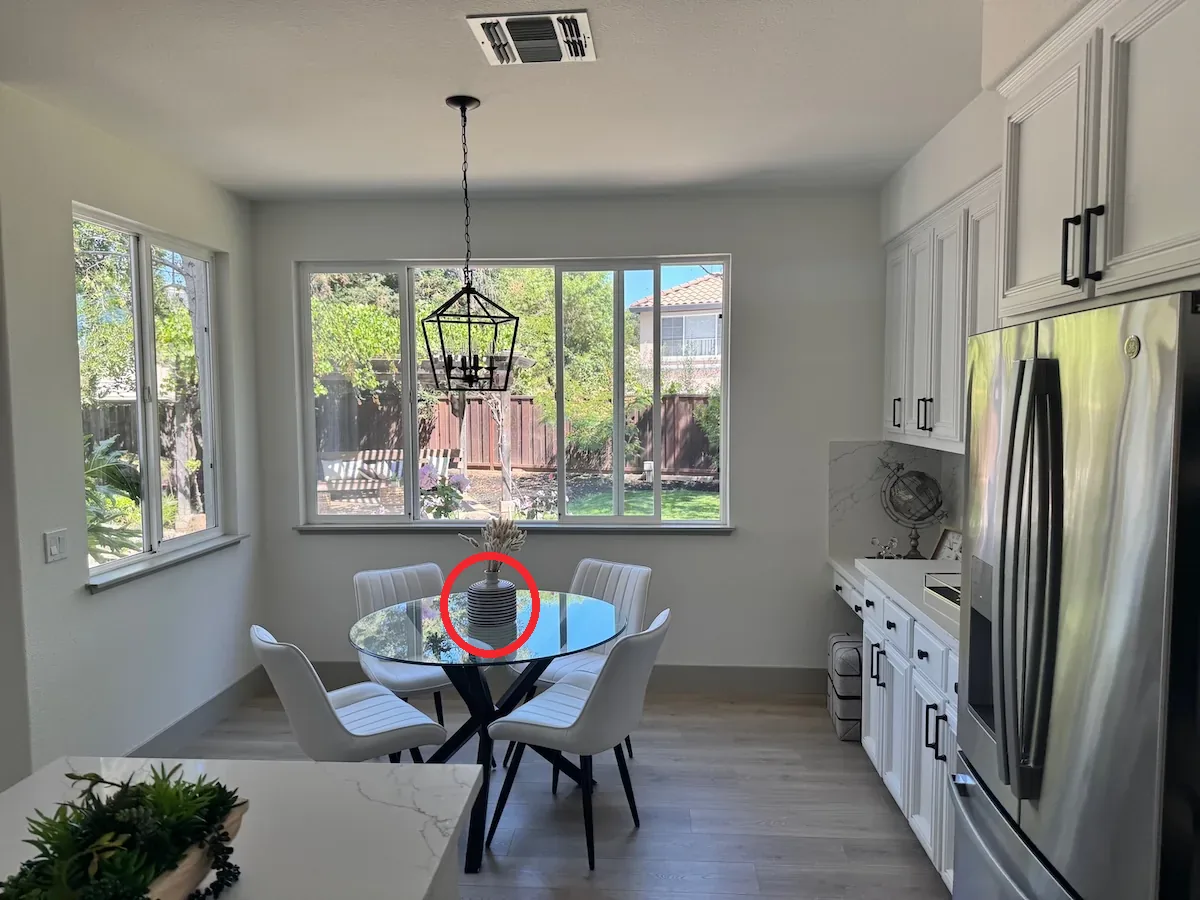
Flare 输出
- 将原始图像作为第一张输入图像。
- 创建独立的透明 PNG,包含圆圈、草图或其他标注。调整方向后,标注图层与第一张图像必须有相同的宽度和高度。PNG 必须包含透明像素;不要将它与原图合并成不透明图像。
- 将标注图层作为
markup发送。Multipart 请求接受文件上传。JSON 请求接受仅包含image_url或file_id其中一项的对象;image_url可以包含 HTTPS URL 或 base64 data URL。JSON 编辑请求使用images传递输入图像数组。 - 描述所需的变化以及希望保留的细节。使用结果前先进行检查。
标注应用于第一张输入图像。其他图像作为参考。第一张输入图像和标注图层各自最多包含 16,777,216 个像素。标注文件的大小上限为 50 MB。不要将 markup 与 mask 一起使用。
使用蒙版编辑图像
你可以提供蒙版,指明应该编辑图像的哪个部分。
在 GPT Image 中使用蒙版时,系统会向模型发送额外指令,帮助引导相应的编辑过程。
GPT Image 的蒙版编辑完全基于提示词。模型将蒙版作为指导,但可能无法完全精确地遵循其形状。
如果提供多张输入图像,蒙版会应用于第一张图像。
Responses API
使用蒙版编辑图像
import fs from "fs";
import OpenAI from "openai";

const openai = new OpenAI();

async function createFile(filePath: fs.PathLike) {
  const result = await openai.files.create({
    file: fs.createReadStream(filePath),
    purpose: "vision",
  });
  return result.id;
}

const fileId = await createFile("fixtures/sunlit_lounge.png");
const maskId = await createFile("fixtures/mask.png");

const response = await openai.responses.create({
  model: "gpt-6.2-astra",
  input: [
    {
      role: "user",
      content: [
        {
          type: "input_text",
          text: "generate an image of the same sunlit indoor lounge area with a pool but the pool should contain a flamingo",
        },
        {
          type: "input_image",
          file_id: fileId,
          detail: "auto",
        },
      ],
    },
  ],
  tools: [
    {
      type: "image_generation",
      model: "gpt-image-2.5-sunburst",
      quality: "high",
      input_image_mask: {
        file_id: maskId,
      },
    },
  ],
});

const imageData = response.output
  .filter((output) => output.type === "image_generation_call")
  .map((output) => output.result);

if (imageData.length > 0) {
  const imageBase64 = imageData[0];
  if (!imageBase64) throw new Error("Image generation returned no image.");
  fs.writeFileSync("lounge.png", Buffer.from(imageBase64, "base64"));
}
from openai import OpenAI
import base64
client = OpenAI()
def create_file(file_path):
with open(file_path, "rb") as file_content:
result = client.files.create(file=file_content, purpose="vision")
return result.id
fileId = create_file("sunlit_lounge.png")
maskId = create_file("mask.png")
response = client.responses.create(
model="gpt-6.2-astra",
input=[
{
"role": "user",
"content": [
{
"type": "input_text",
"text": "generate an image of the same sunlit indoor lounge area with a pool but the pool should contain a flamingo",
},
{
"type": "input_image",
"file_id": fileId,
},
],
},
],
tools=[
{
"type": "image_generation",
"model": "gpt-image-2.5-sunburst",
"quality": "high",
"input_image_mask": {
"file_id": maskId,
},
},
],
)
image_data = [
output.result
for output in response.output
if output.type == "image_generation_call"
]
if image_data:
image_base64 = image_data[0]
with open("lounge.png", "wb") as f:
f.write(base64.b64decode(image_base64))package main
import (
"context"
"encoding/base64"
"os"
"github.com/openai/openai-go/v3"
"github.com/openai/openai-go/v3/responses"
)
func main() {
client := openai.NewClient()
imageID := uploadImage(client, "sunlit_lounge.png")
maskID := uploadImage(client, "mask.png")
response, err := client.Responses.New(context.Background(), responses.ResponseNewParams{
Model: "gpt-6.2-astra",
Input: responses.ResponseNewParamsInputUnion{OfInputItemList: responses.ResponseInputParam{
responses.ResponseInputItemParamOfMessage(
responses.ResponseInputMessageContentListParam{
responses.ResponseInputContentParamOfInputText("Generate an image of the same sunlit indoor lounge area with a pool, but the pool should contain a flamingo."),
{OfInputImage: &responses.ResponseInputImageParam{FileID: openai.String(imageID), Detail: responses.ResponseInputImageDetailAuto}},
},
responses.EasyInputMessageRoleUser,
),
}},
Tools: []responses.ToolUnionParam{{OfImageGeneration: &responses.ToolImageGenerationParam{
Model: "gpt-image-2.5-sunburst",
Quality: "high",
InputImageMask: responses.ToolImageGenerationInputImageMaskParam{FileID: openai.String(maskID)},
}}},
})
if err != nil {
panic(err)
}
saveFirstGeneratedImage(response, "lounge.png")
}
func uploadImage(client openai.Client, filename string) string {
file, err := os.Open(filename)
if err != nil {
panic(err)
}
defer file.Close()
uploaded, err := client.Files.New(context.Background(), openai.FileNewParams{File: file, Purpose: openai.FilePurposeVision})
if err != nil {
panic(err)
}
return uploaded.ID
}
func saveFirstGeneratedImage(response *responses.Response, filename string) {
for _, output := range response.Output {
if output.Type != "image_generation_call" {
continue
}
image, err := base64.StdEncoding.DecodeString(output.AsImageGenerationCall().Result)
if err != nil {
panic(err)
}
if err := os.WriteFile(filename, image, 0o600); err != nil {
panic(err)
}
return
}
panic("response did not include an image generation call")
}using OpenAI.Files;
using OpenAI.Responses;
#pragma warning disable OPENAI001
string key = Environment.GetEnvironmentVariable("OPENAI_API_KEY")!;
ResponsesClient client = new(key);
OpenAIFileClient files = new(key);
OpenAIFile lounge = await files.UploadFileAsync("sunlit_lounge.png", FileUploadPurpose.Vision);
OpenAIFile mask = await files.UploadFileAsync("mask.png", FileUploadPurpose.Vision);
CreateResponseOptions options = new("gpt-6.2-astra", [ResponseItem.CreateUserMessageItem([
ResponseContentPart.CreateInputTextPart("generate an image of the same sunlit indoor lounge area with a pool but the pool should contain a flamingo"),
ResponseContentPart.CreateInputImagePart(lounge.Id),
])]);
options.Tools.Add(new ImageGenerationTool
{
Model = "gpt-image-2.5-sunburst",
Quality = ImageGenerationToolQuality.High,
InputImageMask = new ImageGenerationToolInputImageMask(mask.Id),
});
ResponseResult response = await client.CreateResponseAsync(options);
ImageGenerationCallResponseItem image = response.OutputItems.OfType<ImageGenerationCallResponseItem>().First();
await File.WriteAllBytesAsync("lounge.png", image.ImageResultBytes.ToArray());require "base64"
require "openai"
require "pathname"
client = OpenAI::Client.new
image = client.files.create(file: Pathname("sunlit_lounge.png"), purpose: :vision)
mask = client.files.create(file: Pathname("mask.png"), purpose: :vision)
response = client.responses.create(
model: "gpt-6.2-astra",
input: [
{
role: :user,
content: [
{
type: :input_text,
text: "Add a flamingo to the pool."
},
{
type: :input_image,
file_id: image.id
}
]
}
],
tools: [
{
type: :image_generation,
model: "gpt-image-2.5-sunburst",
input_image_mask: { file_id: mask.id }
}
]
)
image_call = response.output.find do |item|
item.is_a?(OpenAI::Models::Responses::ResponseOutputItem::ImageGenerationCall)
end
unless image_call.is_a?(OpenAI::Models::Responses::ResponseOutputItem::ImageGenerationCall)
raise "No image generation call returned"
end
File.binwrite("lounge.png", Base64.strict_decode64(image_call.result))Image API
使用蒙版编辑图像
import fs from "fs";
import OpenAI, { toFile } from "openai";

const client = new OpenAI();

const rsp = await client.images.edit({
  model: "gpt-image-2.5-sunburst",
  image: await toFile(fs.createReadStream("fixtures/sunlit_lounge.png"), null, {
    type: "image/png",
  }),
  mask: await toFile(fs.createReadStream("fixtures/mask.png"), null, {
    type: "image/png",
  }),
  prompt: "A sunlit indoor lounge area with a pool containing a flamingo",
});

// Save the image to a file
const image_base64 = rsp.data?.[0]?.b64_json;
if (!image_base64) throw new Error("Image generation returned no image.");
const image_bytes = Buffer.from(image_base64, "base64");
fs.writeFileSync("lounge.png", image_bytes);
from openai import OpenAI
import base64
client = OpenAI()
result = client.images.edit(
model="gpt-image-2.5-sunburst",
image=open("sunlit_lounge.png", "rb"),
mask=open("mask.png", "rb"),
prompt="A sunlit indoor lounge area with a pool containing a flamingo",
)
image_base64 = result.data[0].b64_json
image_bytes = base64.b64decode(image_base64)
# Save the image to a file
with open("composition.png", "wb") as f:
f.write(image_bytes)package main
import (
"context"
"encoding/base64"
"os"
"github.com/openai/openai-go/v3"
)
func main() {
client := openai.NewClient()
image, err := os.Open("sunlit_lounge.png")
if err != nil {
panic(err)
}
defer image.Close()
mask, err := os.Open("mask.png")
if err != nil {
panic(err)
}
defer mask.Close()
response, err := client.Images.Edit(context.Background(), openai.ImageEditParams{
Model: openai.ImageModel("gpt-image-2.5-sunburst"),
Image: openai.ImageEditParamsImageUnion{OfFile: openai.File(image, "sunlit_lounge.png", "image/png")},
Mask: openai.File(mask, "mask.png", "image/png"),
Prompt: "A sunlit indoor lounge area with a pool containing a flamingo",
})
if err != nil {
panic(err)
}
result, err := base64.StdEncoding.DecodeString(response.Data[0].B64JSON)
if err != nil {
panic(err)
}
if err := os.WriteFile("lounge.png", result, 0o600); err != nil {
panic(err)
}
}import com.openai.client.OpenAIClient;
import com.openai.client.okhttp.OpenAIOkHttpClient;
import com.openai.core.MultipartField;
import com.openai.models.images.ImageEditParams;
import java.io.IOException;
import java.io.InputStream;
import java.nio.file.Files;
import java.nio.file.Path;
import java.util.Base64;
Path imagePath = Path.of(System.getenv("OPENAI_EXAMPLE_FILE_PATH"));
Path maskPath = Path.of(System.getenv("OPENAI_EXAMPLE_IMAGE_MASK_PATH"));
try (InputStream image = Files.newInputStream(imagePath);
InputStream mask = Files.newInputStream(maskPath)) {
var images =
client
.images()
.edit(
ImageEditParams.builder()
.model("gpt-image-2.5-sunburst")
.image(
MultipartField.<ImageEditParams.Image>builder()
.value(ImageEditParams.Image.ofInputStream(image))
.contentType("image/png")
.filename(imagePath.getFileName().toString())
.build())
.prompt("A sunlit indoor lounge area with a pool containing a flamingo")
.mask(
MultipartField.<InputStream>builder()
.value(mask)
.contentType("image/png")
.filename(maskPath.getFileName().toString())
.build())
.build());
Files.write(
Path.of("lounge.png"),
Base64.getDecoder().decode(images.data().orElseThrow().get(0).b64Json().orElseThrow()));
}using OpenAI.Images;
#pragma warning disable OPENAI001
string key = Environment.GetEnvironmentVariable("OPENAI_API_KEY")!;
string model = "gpt-image-2.5-sunburst";
ImageClient client = new(model, key);
GeneratedImage image = await client.GenerateImageEditAsync(
"sunlit_lounge.png",
"A sunlit indoor lounge area with a pool containing a flamingo",
"mask.png");
await File.WriteAllBytesAsync("composition.png", image.ImageBytes.ToArray());require "openai"
require "pathname"
require "base64"
client = OpenAI::Client.new
image = OpenAI::FilePart.new(Pathname("sunlit_lounge.png"), content_type: "image/png")
mask = OpenAI::FilePart.new(Pathname("mask.png"), content_type: "image/png")
result = client.images.edit(
image: image,
mask: mask,
model: "gpt-image-2.5-sunburst",
prompt: "A sunlit indoor lounge area with a pool containing a flamingo"
)
generated_image = result.data&.first or raise "No image returned"
File.binwrite("lounge.png", Base64.strict_decode64(generated_image.b64_json))curl -s -D >(grep -i x-request-id >&2) \
-o >(jq -r '.data[0].b64_json' | base64 --decode > lounge.png) \
-X POST "https://api.openai.com/v1/images/edits" \
-H "Authorization: Bearer $OPENAI_API_KEY" \
-F "model=gpt-image-2.5-sunburst" \
-F "mask=@mask.png" \
-F "image[]=@sunlit_lounge.png" \
-F 'prompt=A sunlit indoor lounge area with a pool containing a flamingo'openai images edit \
--model gpt-image-2.5-sunburst \
--image sunlit_lounge.png \
--mask mask.png \
--prompt "A sunlit indoor lounge area with a pool containing a flamingo" \
--raw-output \
--transform 'data.0.b64_json' | base64 --decode > out.png| 图像 | 蒙版 | 输出 |
|---|---|---|
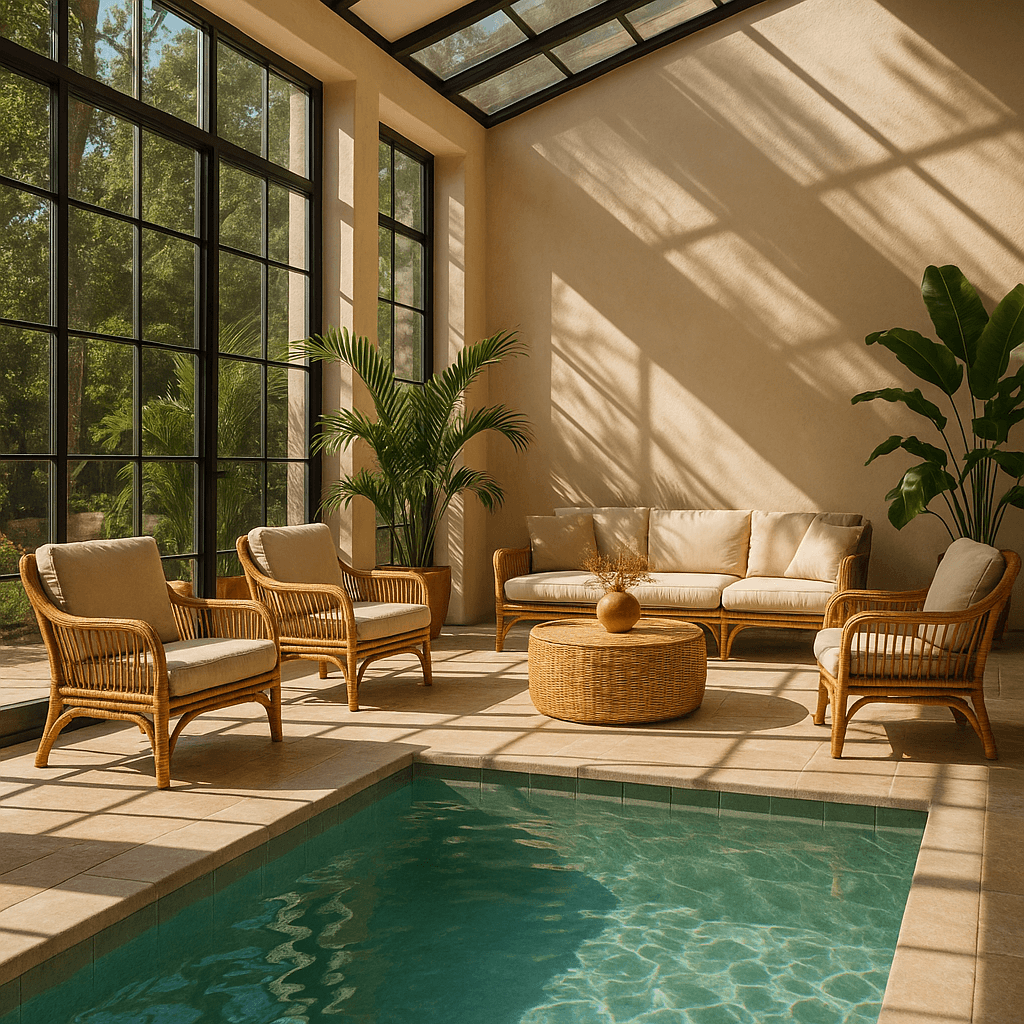 |
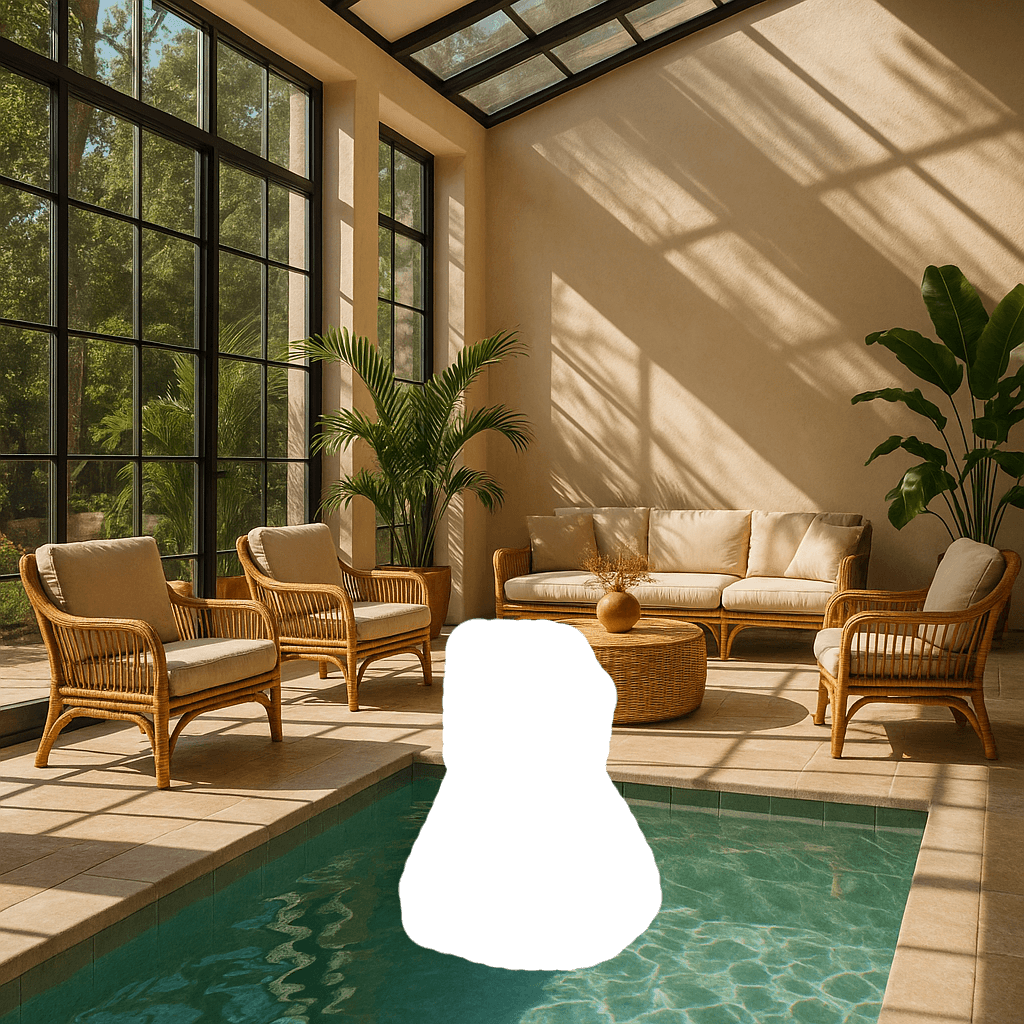 |
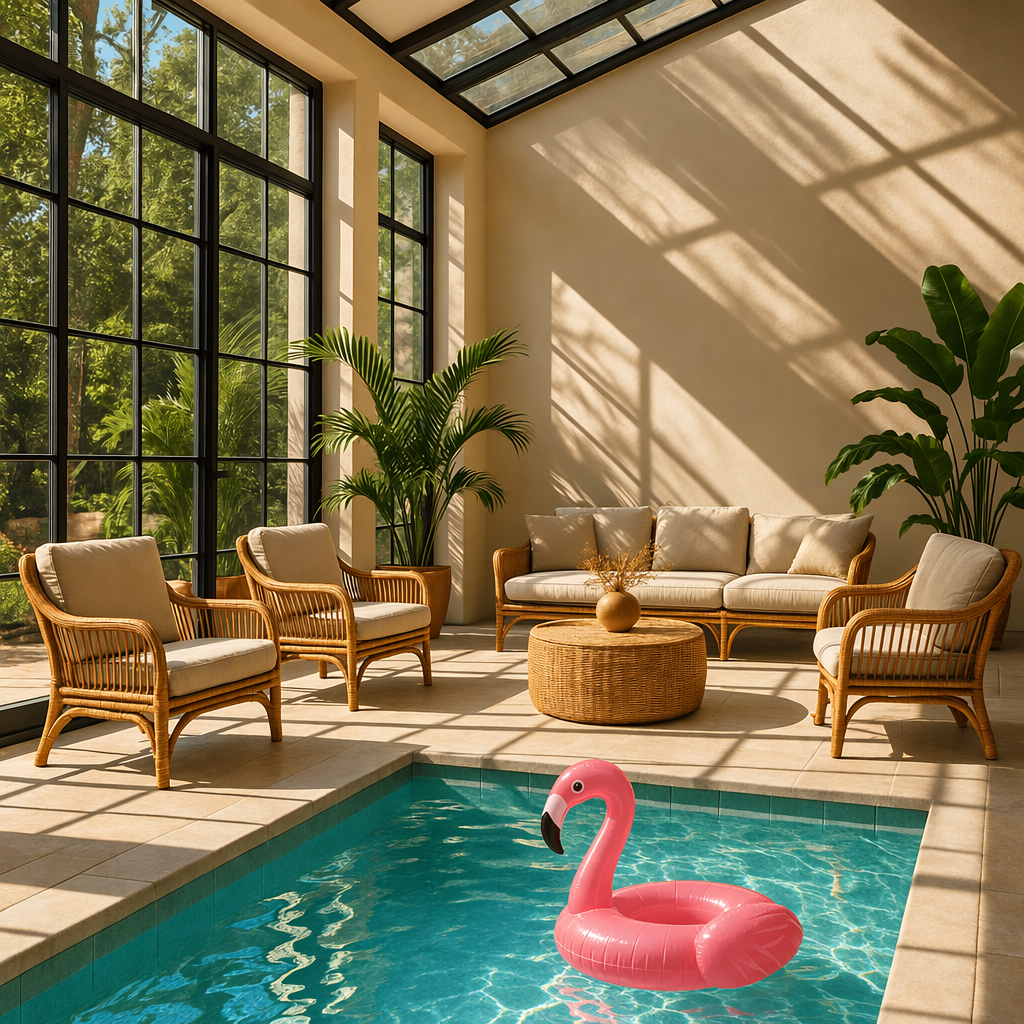 |
提示词:a sunlit indoor lounge area with a pool containing a flamingo
蒙版要求
待编辑的图像与蒙版必须采用相同的格式和尺寸(大小小于 50MB)。
蒙版图像还必须包含 alpha 通道。如果使用图像编辑工具创建蒙版,请确保保存时带有 alpha 通道。
你可以通过程序修改黑白图像,为其添加 alpha 通道。
为黑白蒙版添加 alpha 通道
import { execFileSync } from "node:child_process";

// Requires FFmpeg. Use the grayscale mask as both color and alpha.
execFileSync("ffmpeg", [
  "-v",
  "error",
  "-y",
  "-i",
  "mask.png",
  "-i",
  "mask.png",
  "-filter_complex",
  "[0:v]format=rgb24[color];[color][1:v]alphamerge",
  "-frames:v",
  "1",
  "mask_alpha.png",
]);
from PIL import Image
from io import BytesIO
# 1. Load your black & white mask as a grayscale image
mask = Image.open("mask.png").convert("L")
# 2. Convert it to RGBA so it has space for an alpha channel
mask_rgba = mask.convert("RGBA")
# 3. Then use the mask itself to fill that alpha channel
mask_rgba.putalpha(mask)
# 4. Convert the mask into bytes
buf = BytesIO()
mask_rgba.save(buf, format="PNG")
mask_bytes = buf.getvalue()
# 5. Save the resulting file
img_path_mask_alpha = "mask_alpha.png"
with open(img_path_mask_alpha, "wb") as f:
f.write(mask_bytes)package main
import (
"image"
"image/color"
"image/png"
"os"
)
func main() {
file, err := os.Open("mask.png")
if err != nil {
panic(err)
}
defer file.Close()
mask, _, err := image.Decode(file)
if err != nil {
panic(err)
}
bounds := mask.Bounds()
withAlpha := image.NewNRGBA(bounds)
for y := bounds.Min.Y; y < bounds.Max.Y; y++ {
for x := bounds.Min.X; x < bounds.Max.X; x++ {
gray := color.GrayModel.Convert(mask.At(x, y)).(color.Gray)
withAlpha.SetNRGBA(x, y, color.NRGBA{R: gray.Y, G: gray.Y, B: gray.Y, A: gray.Y})
}
}
output, err := os.Create("mask_alpha.png")
if err != nil {
panic(err)
}
if err := png.Encode(output, withAlpha); err != nil {
panic(err)
}
if err := output.Close(); err != nil {
panic(err)
}
}require "chunky_png"
mask = ChunkyPNG::Image.from_file("mask.png")
mask.pixels.map! do |pixel|
gray = (0.299 * ChunkyPNG::Color.r(pixel) + 0.587 * ChunkyPNG::Color.g(pixel) + 0.114 * ChunkyPNG::Color.b(pixel)).round
ChunkyPNG::Color.rgba(gray, gray, gray, gray)
end
mask.save("mask_alpha.png", color_mode: ChunkyPNG::COLOR_TRUECOLOR_ALPHA)自定义图像输出
你可以配置以下输出选项:
- 尺寸:图像尺寸(例如
1024x1024、1024x1536) - 质量:渲染质量(例如
low、medium、high) - 格式:输出文件格式
- 压缩率:JPEG 和 WebP 格式的压缩程度(0–100%)
- 背景:透明、不透明或自动
size、quality 和 background 支持 auto 选项,模型会根据提示词自动选择最佳选项。
尺寸和质量选项
GPT-Image-2.6 和 GPT-Image-2.5 中的 Sunburst 和 Flare 支持 xhigh 和 max 质量设置,默认均为 auto。更早的 GPT Image 模型最高支持 high 质量设置。
| 设置 | 选项 |
|---|---|
| 推荐尺寸 | 1024x1024(正方形)、1536x1024(横向)、1024x1536(纵向) |
| 质量 | low、medium、high、xhigh、max、auto |
Sunburst 和 Flare 还支持以 WIDTHxHEIGHT 字符串指定自定义尺寸,例如 1536x864。宽度和高度必须为 16 的倍数,宽高比必须介于 1:3 与 3:1 之间,任一边均不得超过 3840 像素。总像素数必须介于 655,360 与 8,294,400(4K)之间。对于 GPT-Image-2.5,高于 2560x1440 的分辨率属于实验性功能。
要生成透明背景,将 background: "transparent",并使用 output_format: "png" 或 "webp"。
使用 quality: "low" 快速制作草稿。制作最终素材时,比较较高质量设置,在细节、延迟和成本之间找到合适的平衡。
输出格式
Image API 返回 base64 编码的图像数据。默认格式为 png,但你也可以请求 jpeg 或 webp。
使用 jpeg 或 webp 时,你还可以指定 output_compression 参数,控制压缩程度(0–100%)。例如,output_compression=50 会将图像压缩 50%。
使用 jpeg 比 png 更快,因此,如果关注延迟,应优先使用这种格式。
生成 SVG 输出
在 POST /v1/images/generations 中设置 output_format: "svg"。对于图标和插图等需要可编辑路径、形状及颜色的图形,可使用 SVG。
将 n 设为 1。SVG 输出不支持流式传输、局部图像或 output_compression。图像编辑端点不支持 SVG 输出,SVG 也不是受支持的图像编辑栅格输入格式。
API 会创建一张参考图像,并利用它制作 SVG。quality 设置控制这张参考图像。将 data[0].b64_json 作为 base64 解码,并将得到的 UTF-8 XML 字节保存为扩展名为 .svg 的文件。返回的文档包含静态矢量内容,不支持脚本、外部资源或嵌入的栅格图像。
Flare 和 Sunburst 使用同一条 Field & Flour 面包店标志提示词,生成了这些 SVG 标志。
GPT-Image-2.6 Flare

GPT-Image-2.6 Sunburst

生成 GIF 动画输出
在 POST /v1/images/generations 或 POST /v1/images/edits 中设置 output_format: "gif"。在提示词中描述主体、动作以及所需的循环效果。要用静态参考图像引导动画,请将参考图像发送至图像编辑端点。
在任一端点输出 GIF 时,使用以下请求字段:
| 字段 | 值 | 默认值 |
|---|---|---|
frame_count |
2–16 帧 | 9 |
frame_duration_ms |
每帧 20–2000 毫秒,按 10 ms 取整 | 200 |
size |
auto,或宽高为 16 的正整数倍的 WIDTHxHEIGHT |
auto |
size 描述每一帧成品的尺寸。帧数、帧尺寸和动画数量必须符合模型的尺寸限制及请求总像素预算。如果请求超出这些限制,请减小 frame_count、帧尺寸或 n。使用 auto,让 API 在模型限制内选择帧尺寸。
响应包含完成的动画。将每个结果的 b64_json 值作为 base64 解码,并将字节保存为扩展名为 .gif 的文件。GIF 输出不支持流式传输、局部图像或自定义 output_compression。仅在 GIF 输出中使用 frame_count 和 frame_duration_ms。
Sunburst 以 frame_count=9 和 frame_duration_ms=200 生成了这段灯笼动画。猴子在 1.8 秒后回到起始姿势。
限制
GPT Image 模型是功能强大且用途广泛的图像生成模型,但仍有一些需要注意的限制:
- **延迟:**复杂提示词的处理可能长达 2 分钟。
- **文字渲染:**尽管已有明显改善,模型仍可能难以精确放置文字并保证清晰度。
- **一致性:**虽然可以生成一致的图像,但在多次生成中,对反复出现的角色或品牌元素,模型偶尔仍难以保持视觉一致性。
- **构图控制:**尽管指令遵循有所改善,模型在结构化或布局敏感的构图中,仍可能难以精确放置元素。
内容审核
所有提示词和生成的图像都会按照我们的内容政策进行过滤。
使用 GPT Image 模型生成图像时,你可以通过 moderation 参数控制审核严格程度。该参数支持两个值:
auto(默认):标准过滤,力求限制生成某些类别、可能不适合特定年龄的内容。low:限制较少的过滤。
处理被阻止的请求和其他错误
处理图像生成失败的方式与处理其他 API 错误相同:检查 HTTP 状态或 SDK 异常类型,记录请求 ID,并参阅错误代码指南,了解身份验证、配额、速率限制和服务器故障。对暂时性的速率限制及服务器故障使用退避重试。对于配额错误,以及需要更改请求的图像生成用户错误,不要自动重试。
部分图像生成失败可由用户纠正,可能返回 error.type = "image_generation_user_error"。在未修改提示词或输入图像的情况下,不要自动重试这些错误。以编程方式处理时,使用 error.code 作为稳定的区分依据。
当 error.code = "moderation_blocked" 时,错误还可能包含可选的 error.moderation_details 对象:
{
  "error": {
    "type": "image_generation_user_error",
    "code": "moderation_blocked",
    "moderation_details": {
      "moderation_stage": "input",
      "categories": ["harassment"]
    }
  }
}
moderation_details 对象提供粗粒度的调试背景,而不暴露内部分类器标签或分数。
moderation_stage 可以是:
input:阻止来自提示词或请求输入。output:阻止来自生成的图像或后续的输出审核阶段。unknown:难以确定来源时,偶尔使用的回退值。
categories 包含粗粒度的公开标签。例如,你可能看到 harassment、self-harm、sexual 或 violence 等值。
对于大多数应用,面向终端用户的主要消息应保持通用。将 moderation_details 用于开发者日志、支持工作流、分析和简短的修正提示。
处理因审核而被阻止的图像生成错误
import OpenAI from "openai";

const openai = new OpenAI();

try {
  // The same error handling pattern applies to image generation requests,
  // image edits, and Responses API tool calls that generate images.
  await openai.images.generate({
    model: "gpt-image-2.5-sunburst",
    prompt: "Create a poster humiliating my coworker with insulting captions",
  });
} catch (error) {
  if (
    !(error instanceof OpenAI.APIError) ||
    error.code !== "moderation_blocked"
  ) {
    throw error;
  }

  const moderationDetails =
    error.error && "moderation_details" in error.error
      ? (error.error.moderation_details as {
          categories?: string[];
          moderation_stage?: string;
        })
      : undefined;
  const categories = moderationDetails?.categories ?? [];
  const stage = moderationDetails?.moderation_stage;

  let hint =
    "This request could not be completed because it did not meet safety requirements.";

  if (categories.includes("harassment")) {
    hint =
      "Try removing abusive or targeting language and focus on neutral visual details instead.";
  } else if (stage === "input") {
    hint =
      "Try revising the prompt or input images and submit the request again.";
  } else if (stage === "output") {
    hint =
      "The generated result was blocked by a safety check. Try changing the prompt and generating again.";
  }

  console.error("Image generation blocked", {
    request_id: error?.requestID,
    code: error?.code,
    moderation_details: moderationDetails,
  });

  console.log(hint);
}
import openai
from openai import OpenAI
client = OpenAI()
try:
# The same error handling pattern applies to image generation requests,
# image edits, and Responses API tool calls that generate images.
client.images.generate(
model="gpt-image-2.5-sunburst",
prompt="Create a poster humiliating my coworker with insulting captions",
)
except openai.BadRequestError as error:
if error.code != "moderation_blocked":
raise
error_body = error.body if isinstance(error.body, dict) else {}
moderation_details = error_body.get("moderation_details") or {}
categories = moderation_details.get("categories") or []
stage = moderation_details.get("moderation_stage")
hint = "This request could not be completed because it did not meet safety requirements."
if "harassment" in categories:
hint = "Try removing abusive or targeting language and focus on neutral visual details instead."
elif stage == "input":
hint = "Try revising the prompt or input images and submit the request again."
elif stage == "output":
hint = "The generated result was blocked by a safety check. Try changing the prompt and generating again."
print(
"Image generation blocked",
{
"request_id": error.request_id,
"code": error.code,
"moderation_details": moderation_details,
},
)
print(hint)package main
import (
"context"
"encoding/json"
"errors"
"fmt"
"slices"
"github.com/openai/openai-go/v3"
)
func main() {
client := openai.NewClient()
_, err := client.Images.Generate(context.Background(), openai.ImageGenerateParams{
Model: openai.ImageModel("gpt-image-2.5-sunburst"),
Prompt: "Create a poster humiliating my coworker with insulting captions",
})
if err == nil {
return
}
var apiError *openai.Error
if !errors.As(err, &apiError) || apiError.Code != "moderation_blocked" {
panic(err)
}
var body struct {
ModerationDetails struct {
Categories []string `json:"categories"`
ModerationStage string `json:"moderation_stage"`
} `json:"moderation_details"`
}
if err := json.Unmarshal([]byte(apiError.RawJSON()), &body); err != nil {
panic(err)
}
hint := "This request could not be completed because it did not meet safety requirements."
if slices.Contains(body.ModerationDetails.Categories, "harassment") {
hint = "Try removing abusive or targeting language and focus on neutral visual details instead."
} else if body.ModerationDetails.ModerationStage == "input" {
hint = "Try revising the prompt or input images and submit the request again."
} else if body.ModerationDetails.ModerationStage == "output" {
hint = "The generated result was blocked by a safety check. Try changing the prompt and generating again."
}
fmt.Printf("Image generation blocked (%s): %s\n", apiError.Code, hint)
}import com.openai.client.OpenAIClient;
import com.openai.client.okhttp.OpenAIOkHttpClient;
import com.openai.errors.BadRequestException;
import com.openai.models.images.ImageGenerateParams;
import java.util.List;
import java.util.Map;
try {
var images =
client
.images()
.generate(
ImageGenerateParams.builder()
.model("gpt-image-2.5-sunburst")
.prompt("Create a poster humiliating my coworker with insulting captions")
.build());
System.out.println(images.data().orElseThrow().get(0).b64Json().orElseThrow());
} catch (BadRequestException error) {
if (!error.code().orElse("").equals("moderation_blocked")) {
throw error;
}
Map<?, ?> body = error.body().convert(Map.class);
Object detailsValue = body.get("moderation_details");
Map<?, ?> details = detailsValue instanceof Map<?, ?> values ? values : Map.of();
Object categories = details.get("categories");
Object stage = details.get("moderation_stage");
String hint = "This request did not meet safety requirements.";
if (categories instanceof List<?> values && values.contains("harassment")) {
hint = "Remove abusive or targeting language and focus on neutral visual details.";
} else if ("input".equals(stage)) {
hint = "Revise the prompt or input images, then submit the request again.";
} else if ("output".equals(stage)) {
hint = "Change the prompt and generate again; the generated result was blocked.";
}
System.err.println("Image generation blocked (" + error.code().orElseThrow() + "): " + hint);
}require "openai"
client = OpenAI::Client.new
begin
client.images.generate(
model: "gpt-image-2.5-sunburst",
prompt: "Create a poster humiliating my coworker with insulting captions"
)
rescue OpenAI::Errors::BadRequestError => error
raise unless error.code == "moderation_blocked"
body = Hash.try_convert(error.body) || {}
body = Hash.try_convert(body[:error] || body["error"]) || body
moderation_details = body[:moderation_details] || body["moderation_details"] || {}
categories = moderation_details[:categories] || moderation_details["categories"] || []
stage = moderation_details[:moderation_stage] || moderation_details["moderation_stage"]
hint = "This request did not meet safety requirements."
if categories.include?("harassment")
hint = "Remove abusive or targeting language and focus on neutral visual details."
elsif stage == "input"
hint = "Revise the prompt or input images, then submit the request again."
elsif stage == "output"
hint = "Change the prompt and generate again; the generated result was blocked."
end
warn("Image generation blocked (#{error.code}): #{hint}")
end支持的模型
在 Responses API 中使用图像生成时,gpt-5 及更新的模型应当支持图像生成工具。检查所用模型的详情页,确认目标模型能否使用图像生成工具。
成本和延迟
GPT-Image-2.6 成本
图像输出按每百万计费 token 30 美元收费。使用计算器估算一张图像的输出成本。
文本和图像每百万 token 的费率,请参阅图像生成定价。
标注引导编辑与其他编辑采用相同的 token 费率,不收取额外费用。对于 SVG 输出,参考图像按照图像模型的费率收费,制作 SVG 所使用的 token 按照编写模型的费率收费。总成本取决于每个模型使用多少 token。
GPT-Image-2.5 成本
Responses API 请求除了图像生成成本,还包含主线模型的 token 用量。
两种 GPT-Image-2.5 模型采用相同的 token 费率:每百万图像输入 token 8 美元、每百万缓存图像输入 token 2 美元、每百万图像输出 token 30 美元、每百万文本输入 token 5 美元,以及每百万缓存文本输入 token 1.25 美元。请参阅定价。
使用响应的 usage,衡量你的提示词、尺寸和质量设置所消耗的 token。相同的 token 费率不代表每张图像成本相同:token 消耗会随模型和质量设置而变化。更早模型的定价示例,请参阅早期 GPT Image 模型。
缓存输入定价
对于 GPT-Image-2 和 GPT-Image-2.5,缓存输入定价仅适用于 Responses API 中的图像生成工具,不适用于直接调用 Images API 的请求,包括 /v1/images/edits。
缓存的图像生成输入会反映在账单中,但其缓存 token 数不会包含在 Responses API 的输出中。响应的 usage 无法验证这些缓存命中。
计算成本
选择模型、质量和尺寸,估算输出 token 数和图像输出成本。对于 GPT-Image-2.6 和 GPT-Image-2.5 的 Sunburst 和 Flare 模型,质量选项为 low、medium、high、xhigh 和 max。对于 gpt-image-2,选项为 low、medium 和 high。同一质量设置下,不同模型可能使用不同的 token 数,而每个图像输出 token 的价格相同。进行此估算时,请明确指定质量和尺寸值;auto 取决于生成的图像。
局部图像成本
如果你希望使用 partial_images 参数流式生成图像,每张局部图像会额外产生 100 个图像输出 token。
早期 GPT Image 模型
以下细节适用于更早的模型,不适用于 Sunburst 或 Flare。对于新集成,请使用 GPT-Image-2.6 Sunburst 或 Flare。
GPT-Image-2 设置与输入保真度
只要满足以下约束,gpt-image-2 接受 size 参数中的任意分辨率。正方形图像通常生成最快。
| 常用尺寸 | * 1024x1024(正方形) * 1536x1024(横向) * 1024x1536(纵向) * 2048x2048(2K 正方形) * 2048x1152(2K 横向) * 3840x2160(4K 横向) * 2160x3840(4K 纵向) * auto(默认) |
| 尺寸约束 | * 最长边必须小于或等于 3840px * 两边必须为 16px 的倍数 * 长边与短边之比不得超过 3:1 * 总像素数至少为 655,360,且不超过 8,294,400 |
| 质量选项 | * low * medium * high * auto(默认) |
图像输入保真度
input_fidelity 参数控制模型在编辑和参考图像工作流中保留输入图像细节的程度。对于 gpt-image-2,请省略此参数;API 不允许更改它,因为模型会自动以高保真度处理每个图像输入。
由于 gpt-image-2 始终以高保真度处理图像输入,包含参考图像的编辑请求可能消耗更多图像输入 token。有关成本影响,请参阅视觉成本一节。
更早模型的定价示例
gpt-image-2 之前的模型
gpt-image-2 之前的 GPT Image 模型,首先生成专门的图像 token 来生成图像。延迟和最终成本都与渲染图像所需的 token 数成正比:更大的图像尺寸和更高的质量设置会产生更多 token。
生成的 token 数取决于图像尺寸和质量:
| 质量 | 正方形(1024×1024) | 纵向(1024×1536) | 横向(1536×1024) |
|---|---|---|---|
| 低 | 272 token | 408 token | 400 token |
| 中 | 1056 token | 1584 token | 1568 token |
| 高 | 4160 token | 6240 token | 6208 token |
请注意,你还需要计算输入 token:提示词的文本 token,以及编辑图像时输入图像的图像 token。由于 gpt-image-2 始终以高保真度处理图像输入,包含参考图像的编辑请求可能使用更多输入 token。
请参阅定价页面,了解当前的文本和图像 token 价格,并使用计算成本一节估算图像输出成本。
最终成本为以下各项之和:
- 输入文本 token
- 使用编辑端点时的输入图像 token
- 图像输出 token
历史输出成本
gpt-image-2 支持数千种有效分辨率;下表列出与早期 GPT Image 模型相同的尺寸,以便比较。下方还列出了 GPT Image 1.5、GPT Image 1 和 GPT Image 1 mini 按张计费的旧版输出价格表。估算一次请求的总成本时,仍应计入文本和图像输入 token。
gpt-image-1 已于 2026 年 10 月 23 日停用。以下价格保留用于历史比较。替代模型请参阅弃用通知。
在相同质量设置下,较大的非正方形分辨率有时会比较小或正方形分辨率产生更少的输出 token。
| 模型 | 质量 | 1024 × 1024 | 1024 × 1536 | 1536 × 1024 |
|---|---|---|---|---|
| GPT-Image-2 提供更多尺寸 | 低 | $0.006 | $0.005 | $0.005 |
| GPT-Image-2 提供更多尺寸 | 中 | $0.053 | $0.041 | $0.041 |
| GPT-Image-2 提供更多尺寸 | 高 | $0.211 | $0.165 | $0.165 |
| GPT Image 1.5 | 低 | $0.009 | $0.013 | $0.013 |
| GPT Image 1.5 | 中 | $0.034 | $0.05 | $0.05 |
| GPT Image 1.5 | 高 | $0.133 | $0.2 | $0.2 |
| GPT Image 1 | 低 | $0.011 | $0.016 | $0.016 |
| GPT Image 1 | 中 | $0.042 | $0.063 | $0.063 |
| GPT Image 1 | 高 | $0.167 | $0.25 | $0.25 |
| GPT Image 1 mini | 低 | $0.005 | $0.006 | $0.006 |
| GPT Image 1 mini | 中 | $0.011 | $0.015 | $0.015 |
| GPT Image 1 mini | 高 | $0.036 | $0.052 | $0.052 |